Sugar 25.2 – Release Highlights

Sugar 25.2 – Release Highlights

The latest update for the SugarCRM platform is here! Sugar 25.2 (Q4 2025) brings a breath of fresh air to your daily work with Sugar Sell and Sugar Serve. According to Sonia Shurik, Director of Product Management at SugarCRM, the central theme of this release can be summed up in one phrase: “Simplified User Experience and Greater Productivity”.

The goal is clear: Sellers and service agents should spend less time searching and clicking, and instead focus on what matters most—their customers.

Here is an overview of the most important new features in Sugar 25.2.

1. Modernization of the Dropdown Editor

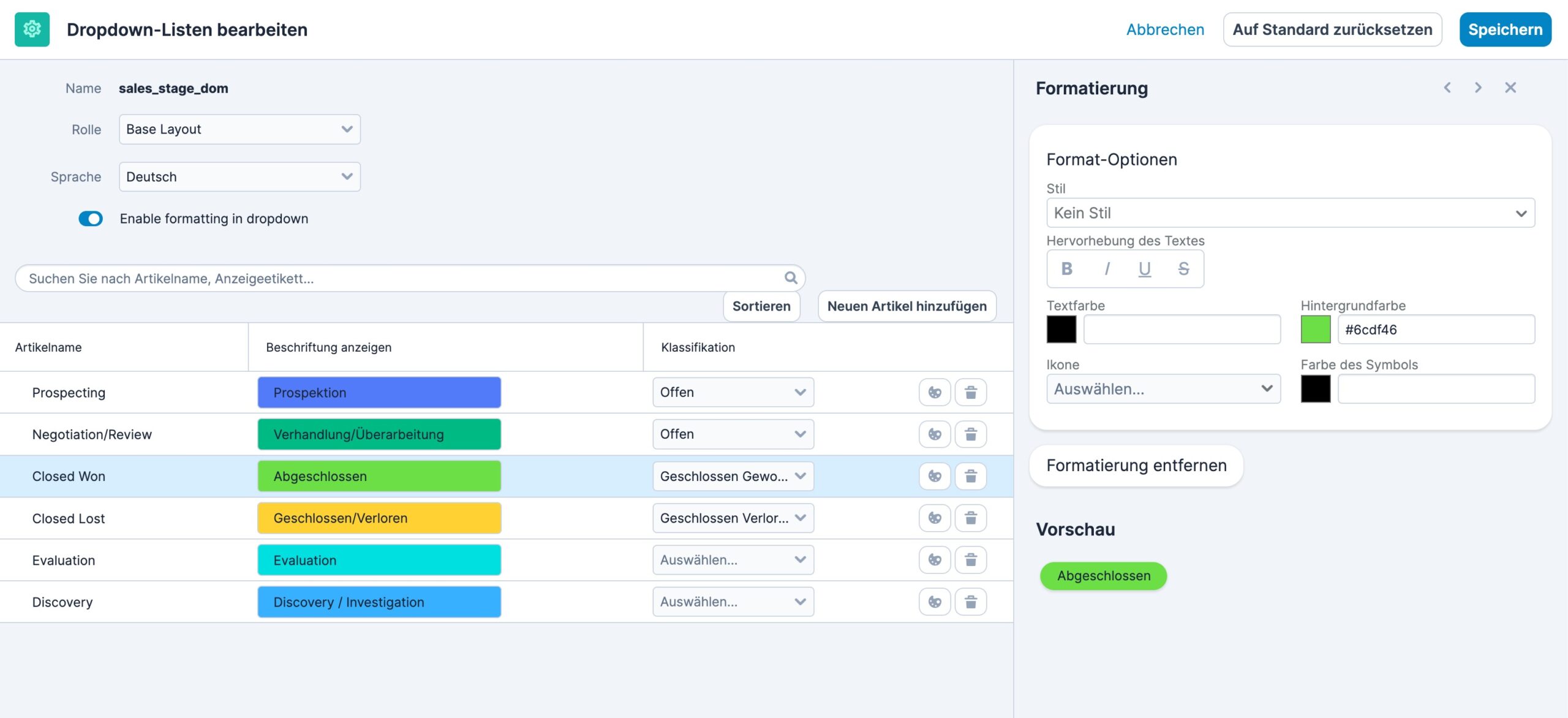
One of the most visible changes for administrators is the overhaul of the Dropdown Editor. It has now been fully integrated into Sugar’s modern user interface (Sidecar).

No more tedious scrolling: You no longer have to edit entries row by row. With the new search and filtering, you can find options instantly as you type.

Massive time savings: It is now possible to add or remove multiple items at once and save everything in one go.

Safety: With the new “Restore Default” option, admins can quickly roll back to the original setup if something goes wrong.

Sugar 25.2 – Release Highlights

2. Add Some Color: Visual Formatting

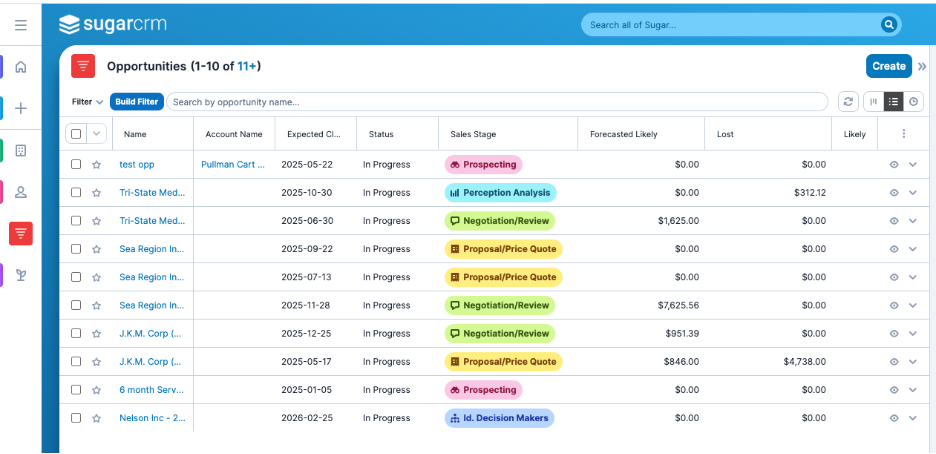
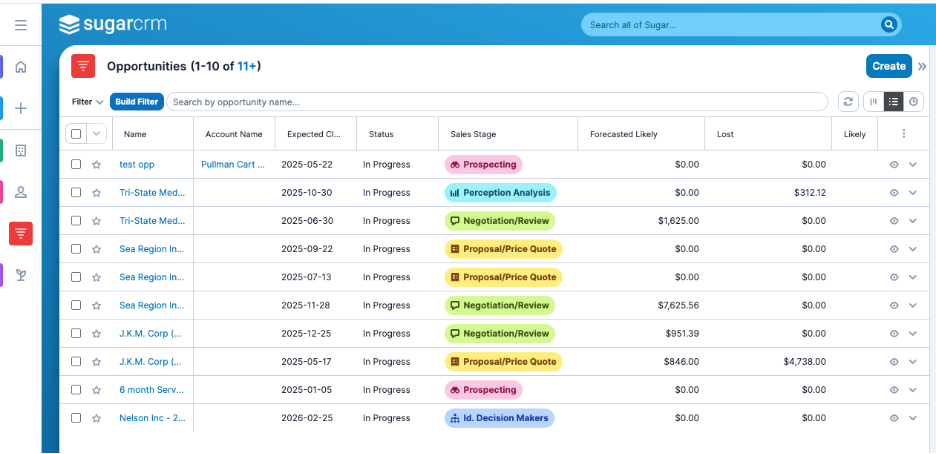
Data doesn’t have to look boring. With Sugar 25.2, you can format dropdown lists to make information stand out. You can define background and font colors for specific values (e.g., Sales Stages or Ticket Priorities).

The best part: These formattings carry through the entire system. They appear in record views, dashboards, charts, and reports.

Sugar 25.2 – Release Highlights

The Benefit: Critical information becomes instantly recognizable. A “High-Value Deal” or an escalated ticket stands out visually, allowing managers and teams to make faster decisions.

3. Actions Directly from Dashlets

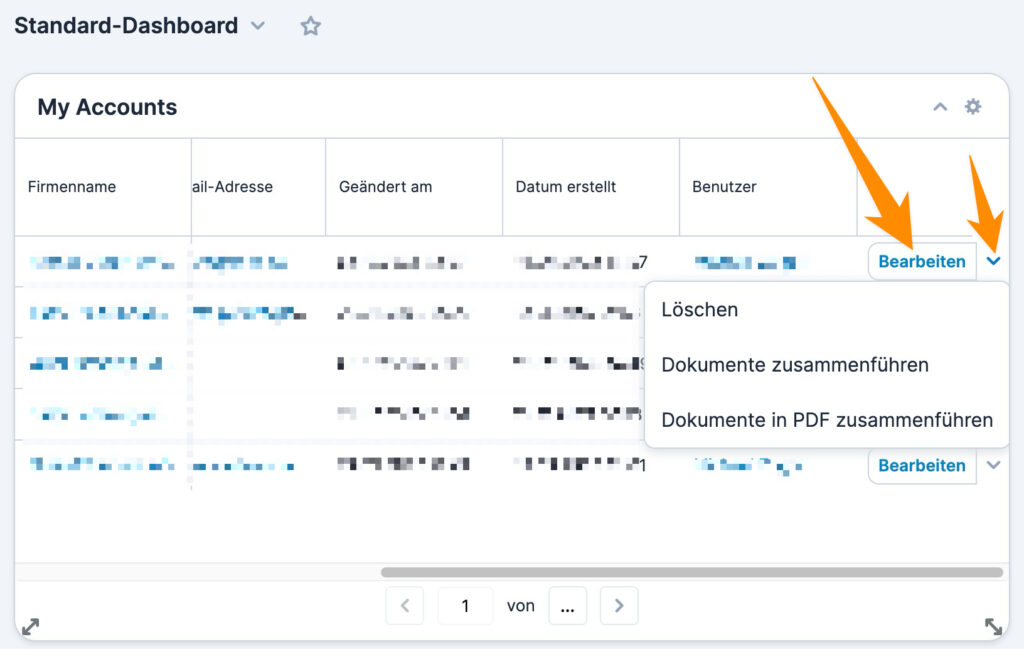
Efficiency means saving clicks. In Sugar 25.2, users can now take action on records directly from List View Dashlets and Focus Drawers.

Previously, you often had to click into the record to make a small update. Now, the same row-level actions available in the standard list view (like Edit or Delete) are seamlessly accessible across dashboards. This significantly speeds up workflows in Sales and Service.

Sugar 25.2 – Release Highlights

4. Pipeline Changes at a Glance (Sugar Sell Premier)

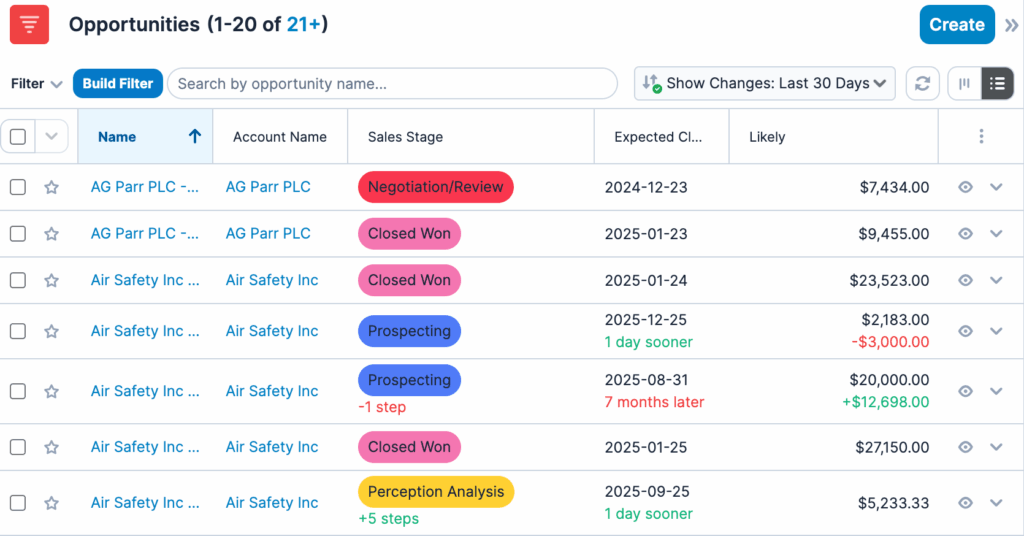
For users of the Sugar Sell Premier edition, there is a powerful new tool for pipeline analysis. You can now view changes in your opportunities over the previous 7, 14, or 30 days.

You can see changes at a glance in:

  • Sales Stages
  • Expected Close Date
  • Likely amounts

As Lydia from the product team explained in the webinar: “This eliminates the busy work of trying to figure out what has changed and allows you to focus on what you need to focus on to make sure your pipeline stays strong”.

Sugar 25.2 – Release Highlights

5. AI Improvements: Actionable Summaries

Artificial Intelligence in Sugar is getting not only smarter but also more actionable.

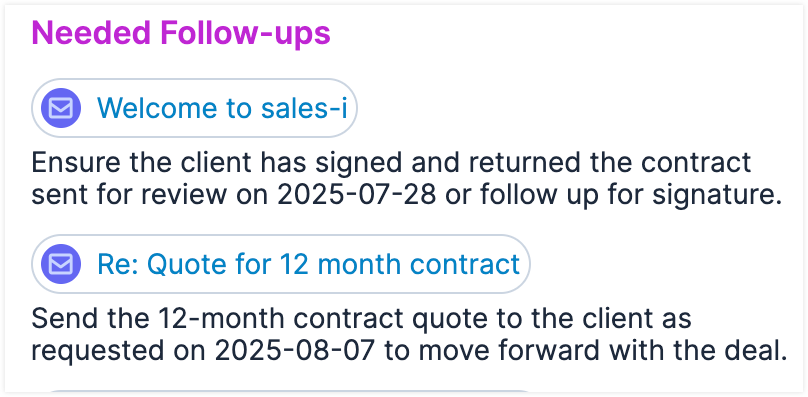
Needed Follow-ups: The AI now detects if you have forgotten to follow up on an email or meeting and surfaces this in the Account Summary.

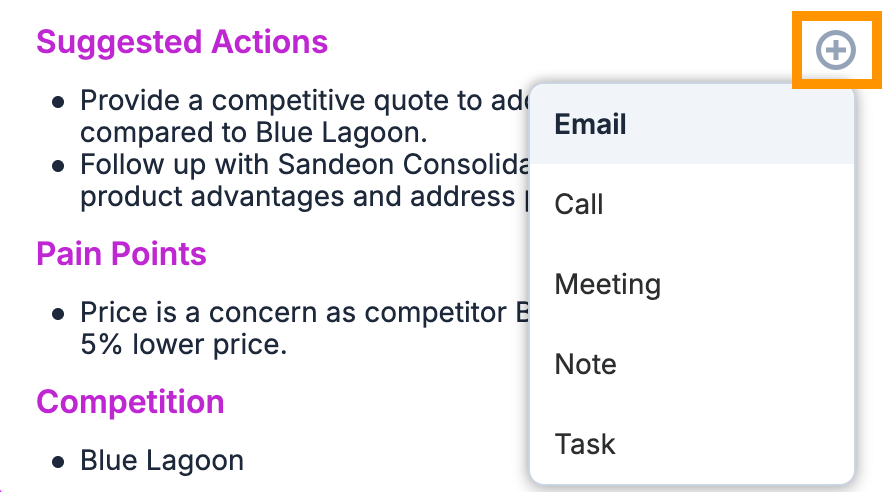
Suggested Actions: Summaries don’t remain passive. The system suggests concrete next steps. With one click, you can create an email, call, or meeting directly from these suggestions, with context automatically populated.

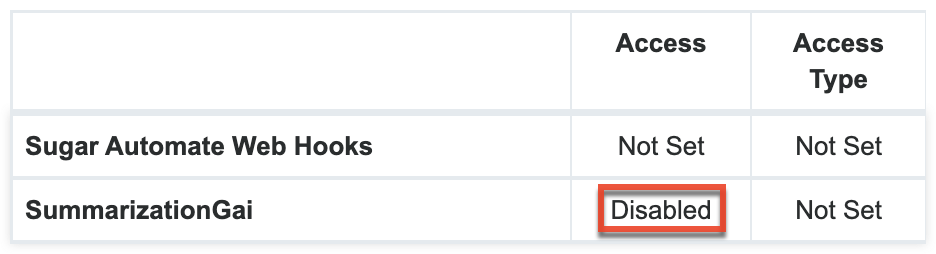
Access Control: Administrators can now prevent users from accessing AI features (like Summarization Dashlets) using module role permissions.

Note for On-Premise Customers: The “Intelligence” packages (including Case and Opportunity Summaries) are now available for on-premise installations, provided IDM is enabled.

6. Mobile App: Be More Productive on the Go

The SugarCRM Mobile App has also received updates in version 25.2 that make life easier for field staff:

Improved Caller ID: The logic has been massively improved to better identify international number formats. Even if the number isn’t stored exactly, the app scans the record to identify the caller.

Multitasking on Tablets: Split-screen is now supported on iPads and Android tablets. You can use Sugar alongside your calendar or product catalog.

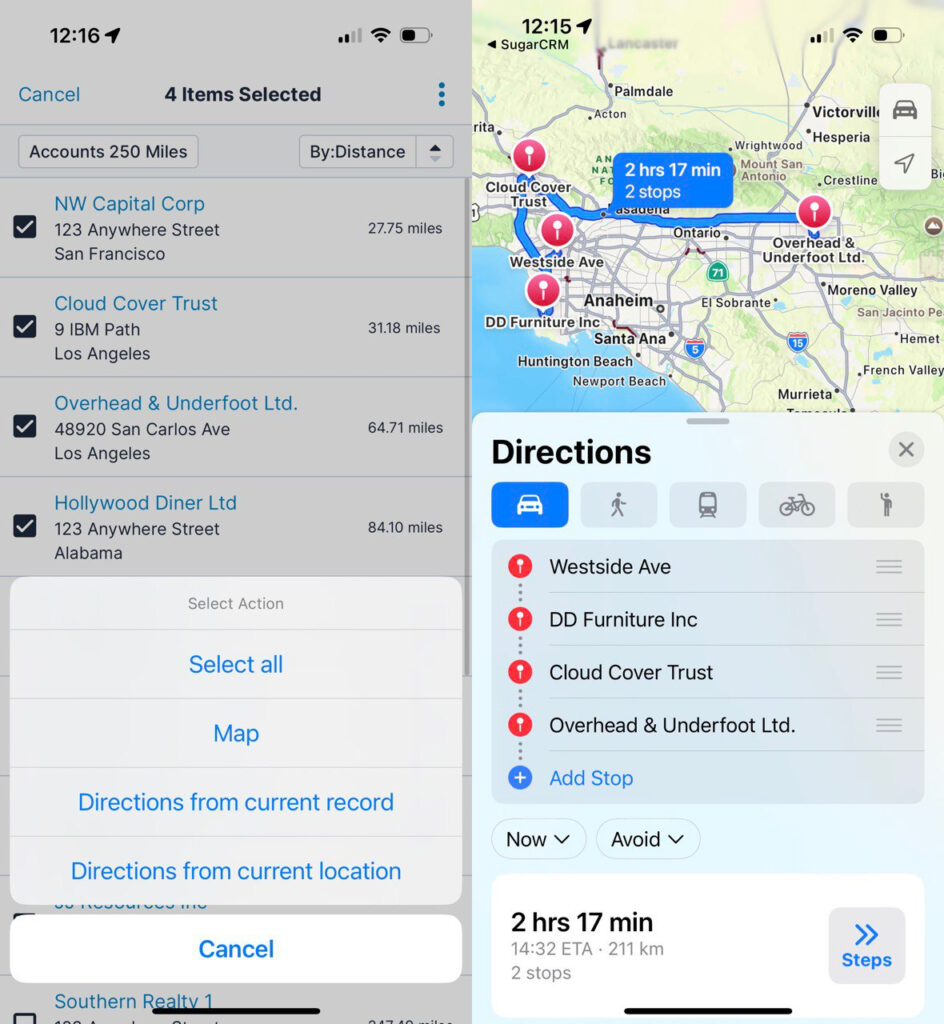
Route Planning: You can create routes between multiple records, supporting trip planning with several stops.

Sugar 25.2 – Release Highlights

7. Sugar Connect: Better Integration

There is also news for the integration with Outlook and Google Calendar (Sugar Connect):

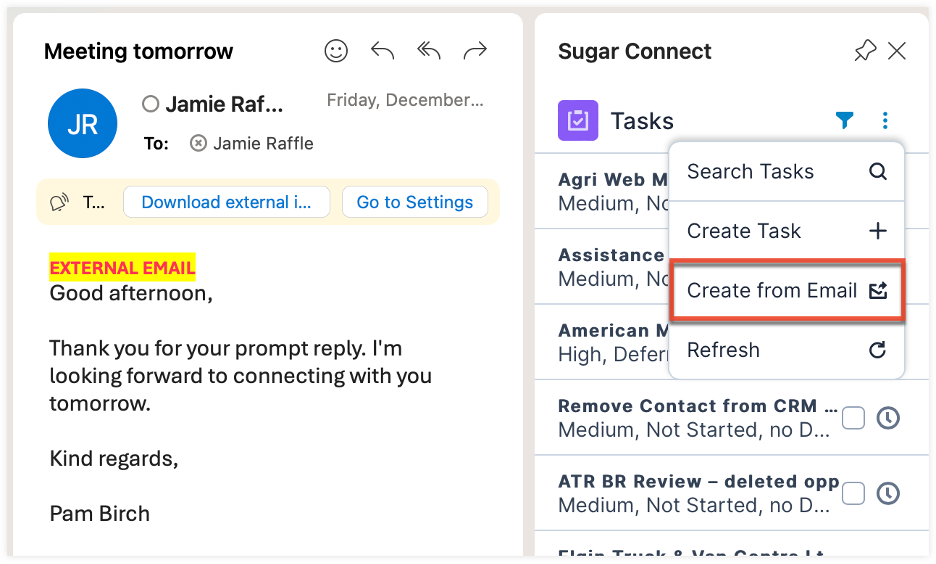
Create Records from Email: When you create a Task, Case, or Opportunity from an email, the subject, body, and contacts are now automatically populated into the Sugar form.

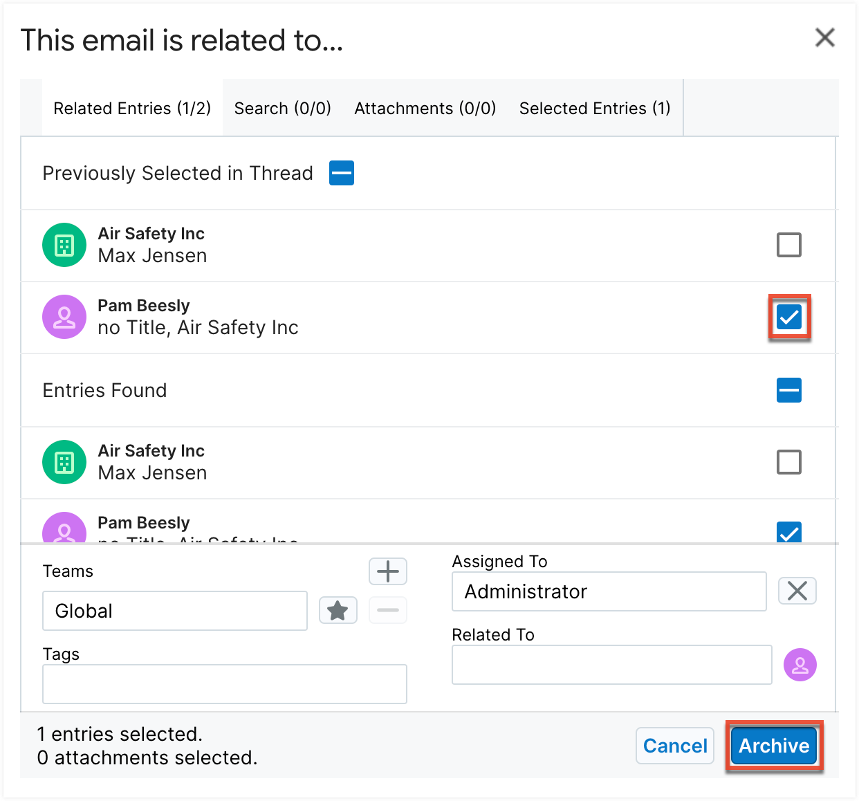
Advanced Archiving: The “Archive with Options” functionality allows you to archive an email to additional records even if it has already been archived to the CRM.

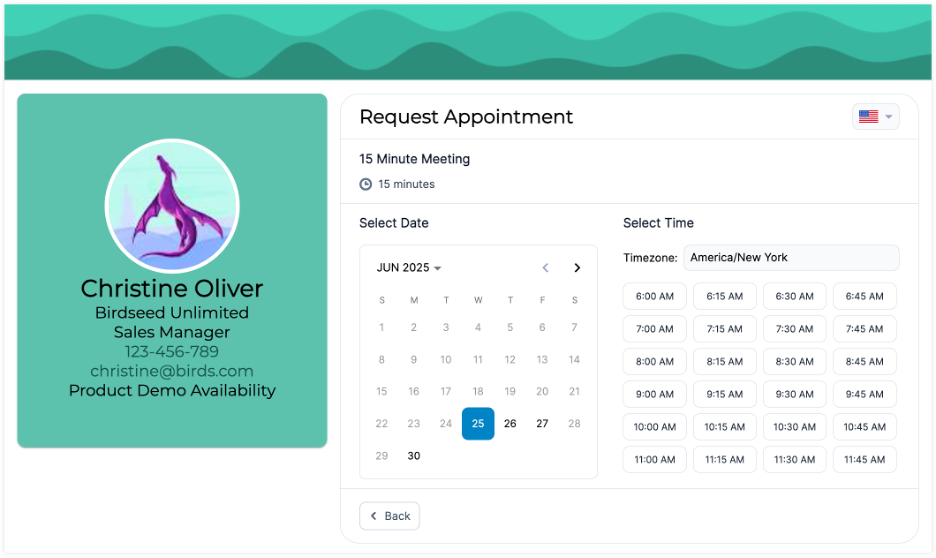
New Look for the Scheduler: The “Meeting Scheduler” pages have been visually updated to match the modern Sugar look and feel.

Conclusion

Sugar 25.2 is an update that focuses heavily on the “Quality of Life” for users. Whether through colors in lists, fewer clicks in dashboards, or smarter mobile features—work becomes easier.

The update is live now. Cloud customers will receive the upgrade automatically according to the SugarCloud policies.

Want to learn more about Sugar 25.2 or need support with the upgrade? Contact us!

WEITERE BEITRÄGE
Leave a Reply

Your email address will not be published.Required fields are marked *

CONTACT

Follow us on

© 2006 - 2025 MyCRM GmbH