The reasons why CRM workflows fail so frequently
Technical problems are rarely the reason workflows fail; often, it’s simply a lack of clarity. Automating chaos without defined processes is a recipe for failure. Workflows are also often overcomplicated: there are too many conditions, exceptions, and notifications. As a result, users overlook the automations or bypass them. Another common problem is poor data quality: if mandatory fields are left empty, rules run into a void or trigger incorrect actions. Finally, it’s often not measurable: without KPIs, no one can see if a workflow really saves time or just generates “more clicks.”
To design workflows effectively, they require:
- Clear process definition (Who does what by when?)
- Clean master data and mandatory fields
- Rules that are short and easy to understand
- Recognizable benefit in daily routine
- Continuous improvement based on KPIs
Creating principles for workflows with high acceptance
Looking at proven principles is sensible before tackling the 12 automations. A good workflow reduces work – it doesn’t force anyone to work. It clearly shows the user the next step without overwhelming them with notifications. It uses meaningful escalations instead of constant reminders. And it is designed to work with real data, not just in a demo.
These five rules are almost always helpful:
- Automation only for standardized processes (clarify everything else first)
- Replace email spam with tasks (tasks/to-dos are more effective)
- Apply SLA logic (when is an escalation needed, when is a reminder enough)
- Track workflows via metrics (Response Time, Throughput, SLA rate)
- Phased introduction (Quick Wins first, then expansion)
The 12 Workflows that can immediately relieve Sales & Service
1) Lead Routing: Automatically assign new leads to the correct owner
Lead distribution is part of daily life – but if it’s done manually, it often takes too long. Speed is crucial for inbound leads because the customer is still actively searching. Good routing ensures that every request goes immediately to the right person: based on region, industry, product, team utilization, or language. It also ensures that leads don’t end up “in nirvana.” It’s essential that routing remains transparent: Sales must be able to see why a lead ended up with them. Otherwise, frustration arises instead of efficiency.
Workflow Proposal:
- Assign owner according to ruleset when creating a lead.
- If no rule applies → Fallback Queue + Task to Sales Ops
- First contact within X hours → Escalation to team lead
2) Response Time SLA: Escalate when there's a lack of reaction
Most teams track leads but not response times. Response time is one of the strongest levers for conversion – and a classic workflow candidate. The trick: no hourly reminders, but clear escalation levels. A workflow should only become active when there’s a real deviation from the standard. This way, it remains meaningful and isn’t overlooked. The escalation should also lead to a specific result, such as redistribution to another employee.
Workflow Concept:
- "New" Lead Status → Timer begins
- No activity after X hours → Task + Hint
- After Y hours → Escalation / Reassign if necessary
3) Lead Nurturing: Follow-up tasks instead of "forgetting"
Not every lead is ready to buy immediately. Without nurturing, they vanish into the database until someone accidentally finds them again. Workflows allow for standardized follow-up planning without everything needing to be set manually. The advantage lies not just in being more active, but also in consistency. Even new colleagues immediately work with the same rhythm. Plus: The Sales Manager can measure whether nurturing is actually taking place.
Workflow Concept:
- Lead = "In Review" → Task series (T+2, T+7, T+14)
- Series stops automatically when the goal (Meeting) is reached
4) Opportunity Stage-Gate: Define mandatory information per phase
A pipeline is only as good as the data it processes. Forecasting is useless if opportunities are moved through phases without clear criteria. Stage-gates solve this: in each phase, certain fields must be filled (Decision maker, Budget, next Appointment, Competition). This doesn’t require bureaucracy, but clarity. It’s crucial that mandatory fields actually help and aren’t just selected “from an admin’s point of view.” The fewer mandatory fields, the better – as long as they are the right ones.
Workflow Concept:
- Phase change → Check mandatory fields
- If empty → Reset phase or Task "Add data"
- Optional: Hint in the user interface instead of a hard blockade
5) Stagnation Alarm: Automatically "bring movement" to deals that stall too long
Many deals die quietly: they stagnate in a phase without anyone noticing. A stagnation workflow highlights this. Instead of alerting generically, it should work segmented by deal size, phase, and key account status: this way, Sales receives useful hints instead of experiencing “alarm fatigue.” In practice, this proves extremely effective because it reduces lost pipeline and makes forecasts more realistic.
Workflow Concept:
- If phase has remained the same for X days → Task "Define next step"
- After Y days → Escalation to team lead / Deal Review
6) Quoting Process: Automatically plan follow-ups when "Quote sent" occurs
It’s easy to follow up, but it’s constantly forgotten. A workflow handles this reliably. An important point: follow-ups shouldn’t happen too early, otherwise they seem intrusive. A good workflow considers deal type and cycle. It should also stop automatically when the customer responds. This creates a calm, sensible rhythm. In this way, “we should follow up sometime” becomes a stable process.
Workflow Concept:
- Status "Quote sent" → Follow-up task in 3–5 days
- If customer responds → Complete/interrupt task
- If quote is open for over 14 days → Escalation / start Adjustment Play
7) Discount Approval: Clear guidelines, swift decisions
Discount approvals are necessary, but they often proceed chaotically. A workflow creates clarity: who must approve starting from what limit? Important: Sales must not have to wait due to missing information. That’s why it’s vital that the workflow simultaneously requests the base data and justification (margin, competitor, scope). This way, approvals are created faster and with documentation. And the organization learns from discounts since they can be analyzed later.
Workflow Concept:
- Discount > X% → Approval to Sales Lead
- Discount > Y% or Margin < Z% → Finance additionally
- Store result and reasoning in CRM
8) Case Triage: Automatic prioritization and routing of support tickets
In Service, speed and prioritization are everything. SLA compliance suffers when tickets are sorted manually. A workflow can prioritize with just a few criteria: Customer/Contract, Impact, Product, Category, and Language. Furthermore, it can automatically assign cases and trigger standard responses or tasks. This saves huge amounts of time and improves consistency. A clear category system is crucial to ensuring that tickets are not misclassified.
Workflow Concept:
- Case created → Set priority according to rules
- Assignment to Queue/Owner
- Start SLA timer + escalation levels
9) SLA Escalation: Visibility when service times are exceeded
SLAs only have value if violations are not hidden. An SLA workflow monitors time windows and escalates step-by-step: Agent → Team Lead → Management. The escalation should not just inform, but also trigger concrete measures (e.g., reassignment). It’s also valuable to examine SLA violations retrospectively: which categories, which customers, which time periods? This reduces the number of tickets and costs.
Workflow Concept:
- SLA violation imminent → Warning task
- SLA violation → Escalation and Reassignment
- SLA violation → Reporting flag
10) Cross-Sell Trigger: Turning service signals into real opportunities
Service is a gold mine for Sales – you just have to recognize the signals. An upgrade or an additional module can be indicated when there are recurring requests, new requirements, or frequent use of a feature. A workflow can convert such patterns into a “Sales Alert” in an opportunity or a task. This way, revenue is generated from real needs and not from arbitrary campaigns. Simultaneously, the customer experiences a feeling of being understood since the offers are context-based.
Workflow Concept:
- Case Category "Expansion/Integration" → Task to Sales/CS
- More than X similar tickets → Activate Upsell Play
11) Churn Risk Traffic Light: Ticket density and inactivity as an early warning system
Churn is almost always preceded by signs: less contact, more problems, and lower usage. In CRM, these signals can be mapped. A risk traffic light can control everything and trigger concrete actions: move up QBR, Management Call, Service Review. It’s often more profitable to keep existing customers than to acquire new ones because it directly protects the portfolio. It’s important that the rules are clearly understandable and don’t seem like “AI magic” without explanation.
Workflow Concept:
- Inactivity > X days + tickets increasing → Risk = Yellow/Red
- Automatically: Task set "Retention Play" to CS/KAM
12) Handover Sales → Service: Automated onboarding task set
The handover after closing a deal is a classic breaking point. If Service isn’t informed about the sale, onboarding starts bumpily – and the customer immediately has doubts. At “Closed Won,” a workflow can automatically start structured onboarding: kickoff appointment, responsibilities, documents, and checkpoints. This increases customer satisfaction and reduces the number of later tickets. It ensures that Sales and Service play together cleanly without anyone having to “chase up.”
Workflow Concept:
- Opportunity "Closed Won" → Onboarding tasks + determine owner
- Deadline monitoring + escalation
- Optional: Creation of a welcome email / handover document
Statistics Block: Typical improvements brought by CRM automation (example values)
| KPI leverage through workflows | Typical effect after 8–12 weeks |
|---|---|
| Response time for inbound leads | -20 to -40 % |
| Forgotten follow-ups / open tasks | -30 to -60 % |
| SLA compliance in support | +10 to +25 % |
| Pipeline transparency (fewer "dead" deals) | +5 to +15 % Win rate |
Practical Example: Implementation of a phased, agile workflow – Quick Wins in 6 weeks
A B2B company used Sugar, but without many automations. Manual lead distribution, rare follow-up of quotes, and the lack of consistent SLA escalation in support were problems. We introduced it together step-by-step and agily. In Phase 1 (2 weeks), lead routing, response time SLA, and quote follow-ups were identified as quick wins. In Phase 2 (2 weeks), case triage and SLA escalation were implemented in service. In Phase 3 (2 weeks), we set up stage gates, stagnation alarms, and the “Closed Won → Onboarding” handover. Result: fewer leftover leads, significantly faster follow-up processes, and more transparency between Sales and Service – because the CRM actively guided them rather than just documenting.
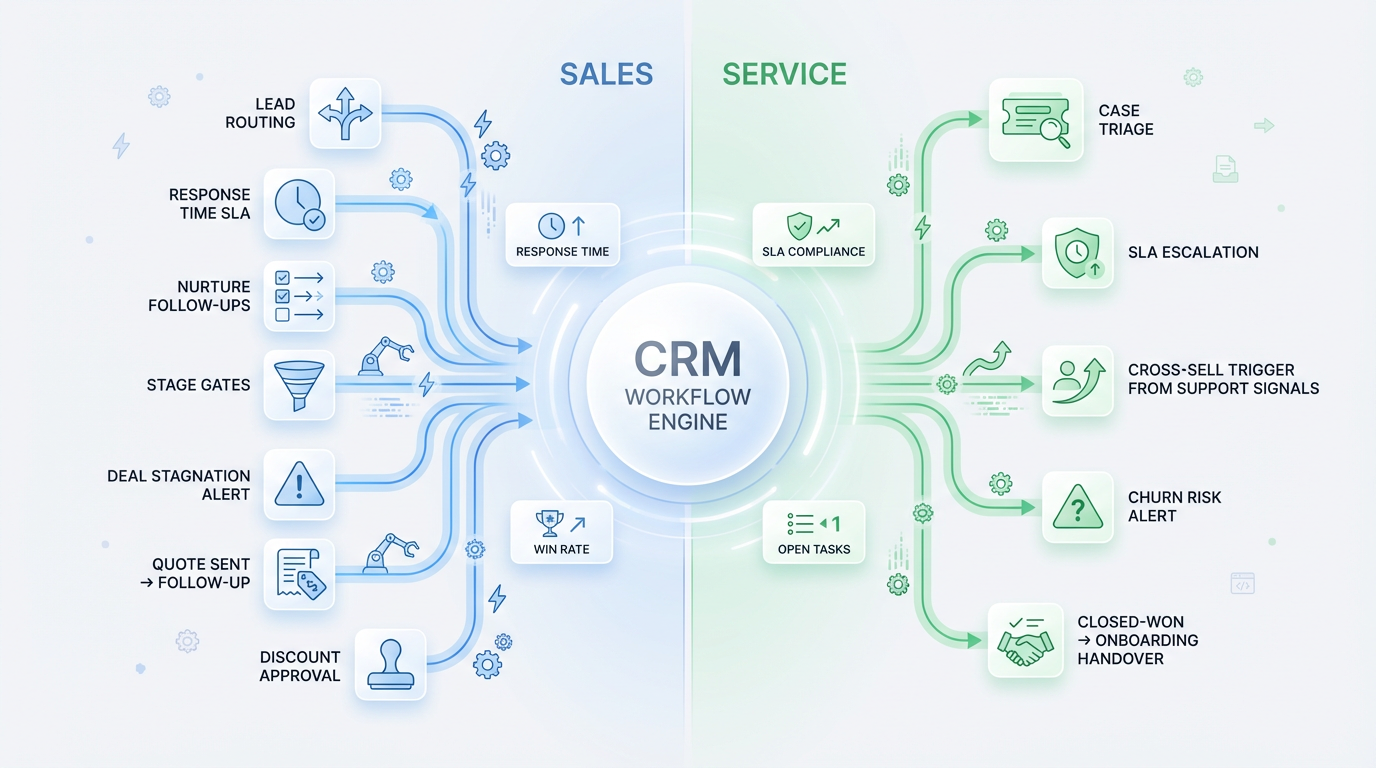
12 Automations for Sales and Service (incl. explanation)
| No. | Automation | Description |
|---|---|---|
| 1 | Lead Routing | Assign new leads automatically by region/industry/product. |
| 2 | Response Time SLA | Timer + escalation if first contact is not made fast enough. |
| 3 | Nurturing Tasks | Automatic follow-up series for leads without immediate buying readiness. |
| 4 | Stage Gates | Mandatory fields per opportunity phase to make pipeline reliable. |
| 5 | Stagnation Alarm | Deals without movement → task/escalation before they die. |
| 6 | Quote Follow-up | When "Quote sent," automatic follow-up according to defined timing. |
| 7 | Discount Approval | Rule-based approvals by discount/margin/deal size. |
| 8 | Case Triage | Ticket prioritization and routing by category, impact, contract. |
| 9 | SLA Escalation | Warning/escalation/reassignment in case of imminent SLA violation. |
| 10 | Cross-Sell Trigger | Service signals generate sales alerts or opportunities. |
| 11 | Churn Risk Traffic Light | Early warning system from inactivity, ticket density, usage signals. |
| 12 | Handover Won → Onboarding | Onboarding task set, kickoff, responsibilities, deadlines automatically. |
Checklist: Are your CRM workflows suitable for everyday use?
- Are there clear, standardized processes for each team (Sales/Service)?
- Are there defined owners, queues, and deputy rules?
- Are mandatory fields and data quality high enough for the rules to work reliably?
- Do SLA times (Response/Resolution) and escalation levels exist?
- Are notifications rare and designed for tasks/actions?
- Is there a phased introduction of workflows (Quick Wins first)?
- Is there monitoring: which workflows are triggered how often – and for what reason?
- Do you measure effects (Response Time, SLA Rate, Win Rate, open tasks)?
- Is there a feedback format for workflow improvements that users can use?
- Is there a regular review (monthly/quarterly) for optimization?