
A CRM is meant to make information available where it is needed for daily work. At the same time, not every employee should automatically be able to see and change all customer, contract, revenue, or service data.
This is exactly where the challenge of CRM permissions begins.
A permission model that is too open can create data protection, confidentiality, and governance problems. A model that is too restrictive, on the other hand, quickly leads to employees not finding information, asking colleagues for access, or exchanging data outside the CRM again.
The best permission architecture is therefore not the one with the most rules. It is the one that connects business responsibility, collaboration, and protection requirements as simply as possible.
CRM permissions are not purely an IT topic
In many CRM projects, roles and permissions are considered relatively late.
First, processes are designed, screens built, data migrated, and integrations set up. Shortly before go-live, the question then arises:
Who is actually allowed to see and edit which data?
That is too late.
Permissions already influence the data model and process design.
For example:
- May a sales employee see all accounts or only their own?
- May regional teams access each other’s data?
- Can customer service see opportunities?
- May sales view open service cases?
- Are revenues or margins visible to everyone?
- May a key account manager see several entities of a corporate group?
- How are changes of position handled?
- Which data may an external partner see?
These questions cannot be answered by IT alone.
They require decisions from sales, service, management, data protection, and, where applicable, information security.
The central question: What must be protected – and what must be shared?
Permission concepts are often designed purely from a protection perspective.
The question is then:
“Who may see this information?”
At least as important, however, is:
“Who must see this information for the customer process to work?”
An example:
Sales may not want every employee to be able to see all opportunity values of an account.
Customer service, however, needs to know that a critical contract renewal is currently under way with an important customer.
Customer success, in turn, needs information about open service problems before a renewal conversation takes place.
If permissions are separated too strictly, new information silos arise within the same CRM.
A good permission model must therefore take protection needs and process needs into account at the same time.
Least privilege – but pragmatic
Restrict access as much as necessary – but enable as much collaboration as makes sense.Das bedeutet beispielsweise:
- protect sensitive financial data more strongly,
- make customer master data more widely visible,
- grant edit rights more narrowly than read rights,
- consistently limit administrative rights,
- protect personal or confidential fields separately.
Consider visibility and editing separately
A common mistake is to treat access as a yes/no decision.
In practice, there are several levels.
An employee can, for example:
- see a record,
- but not edit it,
- add activities,
- change certain fields,
- only read other fields,
- delete records,
- export,
- import,
- assign records to other users,
- perform mass changes.
These permissions carry very different risks.
A sales employee may be allowed to see colleagues’ accounts but should not be able to reassign them.
A service employee may read opportunity information but not change forecast values.
A team leader can edit their team’s records, while an administrator has system-wide permissions.
A permission concept should therefore not only answer the question “Who sees what?”.
It must also define:
“Who may do what with it?”
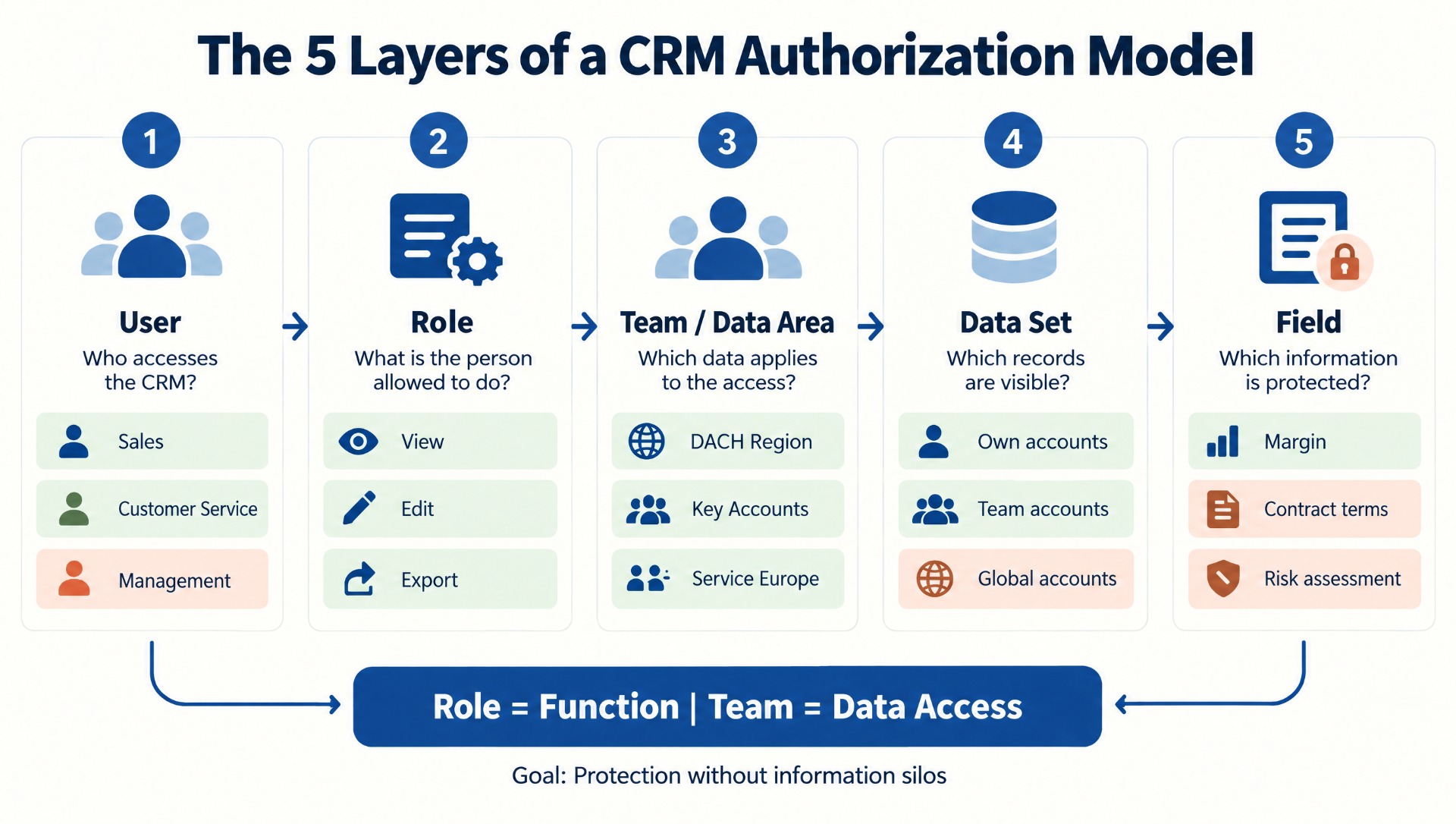
The five levels of a CRM permission model
A solid permission concept can often be structured across five levels.
| Level | Question | Example |
|---|---|---|
| User | Who accesses the CRM? | Account manager, service agent, administrator |
| Role | Which functions may this person use? | Edit opportunities, read accounts |
| Organization / team | Which data area does the access apply to? | DACH Sales, Service Europe |
| Record | Which specific records are visible? | Own accounts, team accounts, global accounts |
| Field | Which information within a record is protected? | Margin, salary, contract terms |
This separation helps avoid unnecessarily complicated special rules.
Roles and teams fulfill different tasks
Especially in flexible CRM platforms, a distinction should be made between functional permissions and data access.
A role typically answers:
What is the user allowed to do?
For example:
- Read accounts
- Edit opportunities
- Create reports
- Delete records
- Change fields
- Perform exports
A team or organizational data area, on the other hand, answers:
Which records may they access?
For example:
- DACH
- EMEA
- Key accounts
- Customer service
- Management
This separation is especially helpful because employees with the same role may need different data areas.
Two account managers may, for example, technically be allowed to do the same things but each look after different regions.
Why too many roles become expensive in the long run
When building a CRM, very specific roles quickly emerge:
- Sales Germany
- Sales Germany Senior
- Sales Austria
- Sales Switzerland
- Sales Manager Germany
- Sales Manager Austria
- Sales Manager Switzerland
- Key Account Germany
- Key Account International
That works at first.
Later, however, more and more combinations arise.
Then it becomes unclear:
- Why does user A have access, but user B does not?
- Which role has to be adjusted when an employee changes position?
- What are the differences between two almost identical roles?
- Which permissions are still being used at all?
The permission concept develops into a technical landscape of its own.
A modular model is usually better:
Role = function
Team / data area = organizational access
This way, combinations can be reused.
Ten building blocks for a good CRM permission concept
| No. | Building block | Key question | Benefit |
|---|---|---|---|
| 1 | User groups | Which typical user profiles exist? | Basis for standardized roles |
| 2 | Functional roles | Which actions may a user group perform? | Prevents unnecessary administrator rights |
| 3 | Data areas | Which records must be visible? | Supports regions and teams |
| 4 | Ownership principle | What meaning does the record owner have? | Clarifies responsibility |
| 5 | Read vs. write permission | Does the user only need to see information or also change it? | Reduces risk without information silos |
| 6 | Field protection | Which fields are particularly sensitive? | Protection of confidential information |
| 7 | Special access | Which legitimate exceptions exist? | Prevents uncontrolled workarounds |
| 8 | External users | Which data may partners or portals see? | Protection of internal information |
| 9 | Review process | How are permissions reviewed regularly? | Prevents historically accumulated permissions |
| 10 | Documentation | Why does a role or rule exist? | Simplifies operations and audits |
The record owner is not automatically the permission architecture
Many CRM systems have an owner responsible for a record.
That makes sense.
It becomes problematic when the following rule automatically results from it:
“Only the owner may see the record.”
This rarely fits modern customer processes.
An account can have a sales owner, while service, customer success, marketing, or management also need information.
The owner should therefore primarily express business responsibility.
Visibility can additionally be controlled via teams, roles, and further rules.
Customer responsibility is often more complex than a single user
Especially with key accounts or international corporate groups, a single owner is often not enough.
A customer can, for example, have:
- Global account manager
- Regional account manager
- Customer success manager
- Service manager
- Internal technical contact
- Executive sponsor
If all these roles are mapped exclusively via user fields, special constructions quickly arise.
In more complex scenarios, it is therefore worth considering whether customer teams or relational responsibilities are better suited.
The data model and the permission model are directly connected here.
Use field-based permissions only where they are truly necessary
Field-level security can be very helpful.
Examples of particularly sensitive information:
- Margin
- Discounts
- Internal assessment of a customer
- Contract terms
- Personal data
- Escalation notes
- Credit information
- Internal risk assessments
But field-based security should not be used excessively.
If 80 fields within a record each have their own permission rules, the system becomes hard to understand and barely testable.
A good question is therefore:
Is this information really so sensitive that it must be protected separately within the same record?
If a very large number of fields have to be protected, this can even indicate that a separate business object would make more sense.
Example: Margin and revenue
A good example of targeted field-level permissions is an opportunity that contains several commercial data points, such as deal value, list price, discount, purchase cost, and margin.
Not every piece of information is equally relevant to every user group. Sales may need the deal value and discount to manage the opportunity effectively. Management may also require access to purchase costs and margin in order to evaluate the profitability of the deal. An external sales partner, on the other hand, may only need to see the expected sales value and should not have access to internal pricing calculations.
In this situation, it usually makes little sense to create different opportunity types or separate records for different user groups. A better approach is to keep the opportunity itself visible to everyone involved while restricting only the particularly sensitive information.
Typical fields could be handled differently:
- Deal Value: visible to Sales and Management
- List Price and Discount: visible to internal Sales
- Purchase Cost: limited to selected internal roles
- Margin: visible only to Management or authorized sales roles
This keeps the shared customer and opportunity context available without exposing confidential commercial information more broadly than necessary. That is exactly where targeted field-level permissions provide real value.
Permissions Should Not Break Customer Processes
A permission model can be technically correct and still make the customer process worse. This happens especially when departments are separated too strictly from one another.
A typical example: Sales cannot see service cases, Service has no visibility into active opportunities, and Customer Success can only access contract information. At first glance, this may look like a clean separation of responsibilities. In day-to-day operations, however, it creates three information silos inside the same CRM.
The impact often becomes visible only during actual customer interactions. A service employee may not realize that an important opportunity is currently at risk. Sales may be unaware that several critical service cases are still open. Customer Success may start a renewal conversation without knowing about ongoing escalations.
In this situation, the permission model fulfills its technical purpose but prevents exactly the kind of collaboration that CRM is supposed to improve.
That is why every restriction should be evaluated not only from a security or privacy perspective. An equally important question is:
Which collaboration does this restriction prevent?
In many cases, the better solution is not to hide an entire area completely. It can be more effective to allow read access, restrict editing rights, or protect only particularly sensitive information. This keeps the necessary customer context available without allowing every user to change everything or view confidential details.
Matrix: Who needs which information?
A simple permission matrix can be very helpful even before technical implementation.
| Data area | Sales | Service | Customer Success | Management |
|---|---|---|---|---|
| Customer master data | Edit | Read | Read | Read |
| Opportunities | Edit | Read (restricted) | Read | Read |
| Service cases | Read | Edit | Read | Read |
| Contracts | Read | Read | Edit | Read |
| Margin | Restricted | No | No | Read |
| Internal escalation | Read | Edit | Read | Read |
| User administration | No | No | No | No |
The specific matrix naturally depends on the company.
The decisive point is the method: permissions are derived from the process, not from technical possibilities.
External partners need their own security model
As soon as partners, dealers, customers, or other external users access CRM data, the importance of the permission concept increases considerably.
A reseller may, for example, see its own opportunities.
But it may not:
- see other partners’ opportunities,
- recognize internal margins,
- view other customer relationships,
- read internal comments,
- look at confidential forecasts.
Especially with partner portals, the data model should therefore already be designed to separate external and internal information cleanly.
“Hiding” individual fields after the fact is considerably riskier than a permission model that is clear from the start.
Do not automatically equate hierarchical permissions with the organizational structure
A sales organization often has a classic hierarchy:
Head of sales
↓
Regional manager
↓
Account manager
It seems obvious to map this structure 1:1 in the CRM.
That can work.
But it can also become problematic.
A matrix organization may simultaneously have:
- Regions
- Products
- Business units
- Key accounts
- Industries
Then a customer can be assigned to several areas of responsibility at the same time.
A purely hierarchical permission concept quickly reaches its limits here.
The actual information need should therefore be analyzed first – and only then should it be decided which organizational structures are relevant for access rights.
Permissions Must Be Considered Automatically When Employees Change Roles
Permission models often work well during onboarding: a new employee receives a role, is assigned to a team, and gets the access needed for the job. Internal changes are usually more difficult. An account manager becomes a team lead, a service employee moves into Customer Success, or someone temporarily takes over another region. Time-limited project access is also common in many organizations.
The problem starts when new permissions are simply added while old access rights remain in place. Over time, employees accumulate permissions from previous roles, projects, or areas of responsibility that they no longer need. This is often referred to as permission accumulation.
A good permission model should therefore cover more than onboarding. It should include a clearly defined Joiner-Mover-Leaver process:
- Joiner: Which standard role and data access should a new employee receive?
- Mover: Which existing permissions must be removed or adjusted when someone changes roles?
- Leaver: Which access rights must be disabled immediately when an employee leaves?
The Mover process is especially important. In practice, this is where the greatest risk often arises because employees keep their old access rights and receive additional ones for their new responsibilities. Temporary access should therefore ideally include an expiration date from the start. This turns permission management from a one-time setup into a continuously maintained process.
Permission reviews should be part of CRM operations
A permission concept is not a one-off project document.
Organizations change.
Teams are merged. Regions change. Employees move. New modules are added.
Permissions should therefore be reviewed regularly.
A pragmatic rhythm could be:
Quarterly
- review privileged users
- check administrator rights
- review external users
- remove temporary special permissions
Semi-annually
- review roles and teams
- have business units confirm access
- identify roles that are no longer used
Annually
- check the entire permission model against organizational structure and processes
- update documentation
- audit critical permissions
Treat administrator rights especially restrictively
CRM administrators inevitably need extensive permissions.
That is exactly why their number should be kept as small as possible.
Not every employee who:
- builds a dashboard,
- supports users,
- adjusts reports,
- imports data,
automatically needs full administrator rights.
Where possible, administrative tasks should be differentiated.
In addition, it should be clearly traceable:
- who is an administrator,
- why the person needs these rights,
- when this permission was last reviewed.
SugarAI: Keep Roles and Teams Clearly Separated
Platforms such as SugarAI can structure permissions across several layers. One of the most important design principles is the separation between functional permissions and organizational data access.
Roles should primarily define what a user is allowed to do in the system. This can include reading or editing opportunities, creating reports, or exporting data. Teams, on the other hand, determine which records a user can access, for example a specific region, business unit, or group of key accounts.
This separation avoids the need to create a separate role for every combination of job function and organizational area. A sales representative, for example, can have the Sales User role while also being assigned to the DACH Sales team. If that employee later moves to another region, the functional role may remain the same while only the team assignment needs to change.
The same model can be extended for a sales manager. The manager receives additional functional permissions and access to several relevant teams. This keeps the permission model modular and understandable even as the organization grows or responsibilities change.
The main advantage is long-term maintainability. Instead of continuously adding new special-purpose roles, a small number of reusable roles can be combined with flexible team assignments. This reduces complexity and makes the overall security model easier to manage.
AI agents need permissions too
With AI agents, a new question arises:
Which data is an agent actually allowed to see – and which actions may it carry out?
A meeting preparation agent may need:
- account data,
- contacts,
- activities,
- opportunities,
- service cases.
But it may not need access to:
- internal HR data,
- confidential margins,
- other regions,
- administrative settings.
Even more important is the distinction between reading and acting.
An agent can, for example:
- only analyze data,
- suggest changes,
- update records,
- send messages,
- trigger processes.
These escalation levels should be controlled deliberately.
The same principle therefore applies to AI as to people:
Grant only the permissions that are actually necessary for the task.
AI governance begins with the permission model
The more AI intervenes in CRM processes, the more important a link between classic CRM security and AI governance becomes.
A company should know, for example:
- Which agents exist?
- Who is responsible for them?
- Which data can they use?
- Which actions may they perform?
- Which actions require human approval?
- Are actions logged?
- Can permissions be revoked at short notice?
In future, the permission model will therefore no longer manage only users.
It increasingly manages people, integrations, and digital agents.
Typical mistakes with CRM permissions
| Mistake | Short-term effect | Long-term problem |
|---|---|---|
| Everyone sees everything | Simple operation | Data protection and confidentiality risks |
| Everyone sees only their own records | Clear separation | Collaboration is prevented |
| Too many special roles | Requirements solved quickly | Permissions become unclear |
| Roles by person instead of function | Individually tailored | High maintenance effort |
| Field permissions for too many fields | Granular control | Complexity and testing effort |
| Administrator rights as a workaround | Problem solved quickly | Increased security risk |
| Temporary access without expiry | Flexibility | Historically accumulated over-permissioning |
| No regular reviews | Less effort | Outdated access remains in place |
| Treating external users like internal ones | Quick implementation | Risk of unintended data disclosure |
| AI agents without their own permission concept | Quick pilot | Unclear data and action rights |
Practical example: From 27 roles to a modular model
- Sales Germany
- Sales Austria
- Sales Switzerland
- Senior Sales Germany
- Senior Sales Austria
- Service Germany
- Service Europe
- Sales Manager DACH
- Key Account International
Phase 1: Define user profiles
Five functional base roles are created:- Sales User
- Sales Manager
- Service User
- Customer Success
- CRM Administrator
Phase 2: Separate data areas
Regions and organizational data access are no longer controlled via roles, but via teams or data areas. Examples:- DACH
- Benelux
- France
- Key accounts
- Global Service
Phase 3: Identify sensitive information
Only a few fields receive additional restrictions:- Margin
- internal risk assessment
- certain contract terms
Phase 4: Introduce a joiner-mover-leaver process
Every change of position triggers a review of the existing permissions. Temporary special access receives an expiry date.Phase 5: Regular review
Management und Fachbereiche bestätigen halbjährlich die wichtigsten Rollen und Datenzugriffe. Das Ergebnis ist nicht weniger Sicherheit. Im Gegenteil. Das Modell wird einfacher – und dadurch besser kontrollierbar.Checklist: Is your CRM permission model set up cleanly?
- Are user roles defined by function rather than by individual person?
- Are organizational data areas separated from functional roles?
- Is it clear which users may read, edit, delete, or export?
- Have particularly sensitive fields been identified?
- Is field-level security used only selectively?
- Is the meaning of the record owner clearly defined?
- Can several internal owners be involved in one account?
- Are external users and partners cleanly separated from internal users?
- Are administrative rights limited to a few users?
- Do temporary special permissions have an expiry date?
- Does a joiner-mover-leaver process exist?
- Are old permissions removed when employees move internally?
- Are roles and teams reviewed regularly?
- Is it documented why important permissions exist?
- Does the model support cross-departmental customer processes?
- Does the permission architecture prevent unnecessary information silos?
- Are export and bulk data rights considered separately?
- Do integrations have only the necessary permissions?
- Is there a dedicated permission concept for AI agents?
- Are agent actions logged and approved where necessary?
Conclusion: Good permissions protect data without preventing collaboration
A good CRM permission model should be neither as open nor as restrictive as possible.
It should be traceable.
Employees need the information they require for their customer process. At the same time, sensitive data, administrative functions, and external access must be protected appropriately.
The most important foundation is a clear separation between:
What may someone do?
and
Which data may someone access?
Those who cleanly separate roles, teams, record visibility, and field protection can design a permission concept in a much more modular way.
This not only reduces security risks.
It also lowers administrative effort and prevents a few roles from turning, over the years, into a barely maintainable web of special permissions.
With AI agents, this topic becomes even more important. In future, CRM permissions must take into account not only people and integrations, but also digital agents that analyze data and carry out actions.
A good permission concept thereby becomes a central component of modern CRM governance.
CTA
Has your CRM permission model grown over the years and become hard to follow?
A permission review can quickly show which roles should be merged, which special permissions removed, and which data areas structured more clearly.