
A CRM for sales, a marketing automation platform, a separate newsletter system. Add to that a service desk, sales engagement, business intelligence and various specialist applications. In many companies, a considerable software landscape has grown up around the customer over the years.
There are usually good reasons for this. Each application was introduced at some point to handle a specific task better or more efficiently. What is rarely considered, however, is how the individual systems work together.
Contacts are maintained several times, leads are transferred between applications and reports are compiled from different data sources. Employees switch between different interfaces, while IT has to look after more and more interfaces. At the same time, modern CRM platforms have long offered functions that used to require standalone applications.
This raises a fundamental question: How many of these tools do we actually still need – and where would it make more sense to bring functions together within a central CRM platform?
The answer is not necessarily the smallest possible software landscape. Specialized applications can serve their purpose far better than a general CRM solution. What matters is finding the right balance between consolidation and best-of-breed.
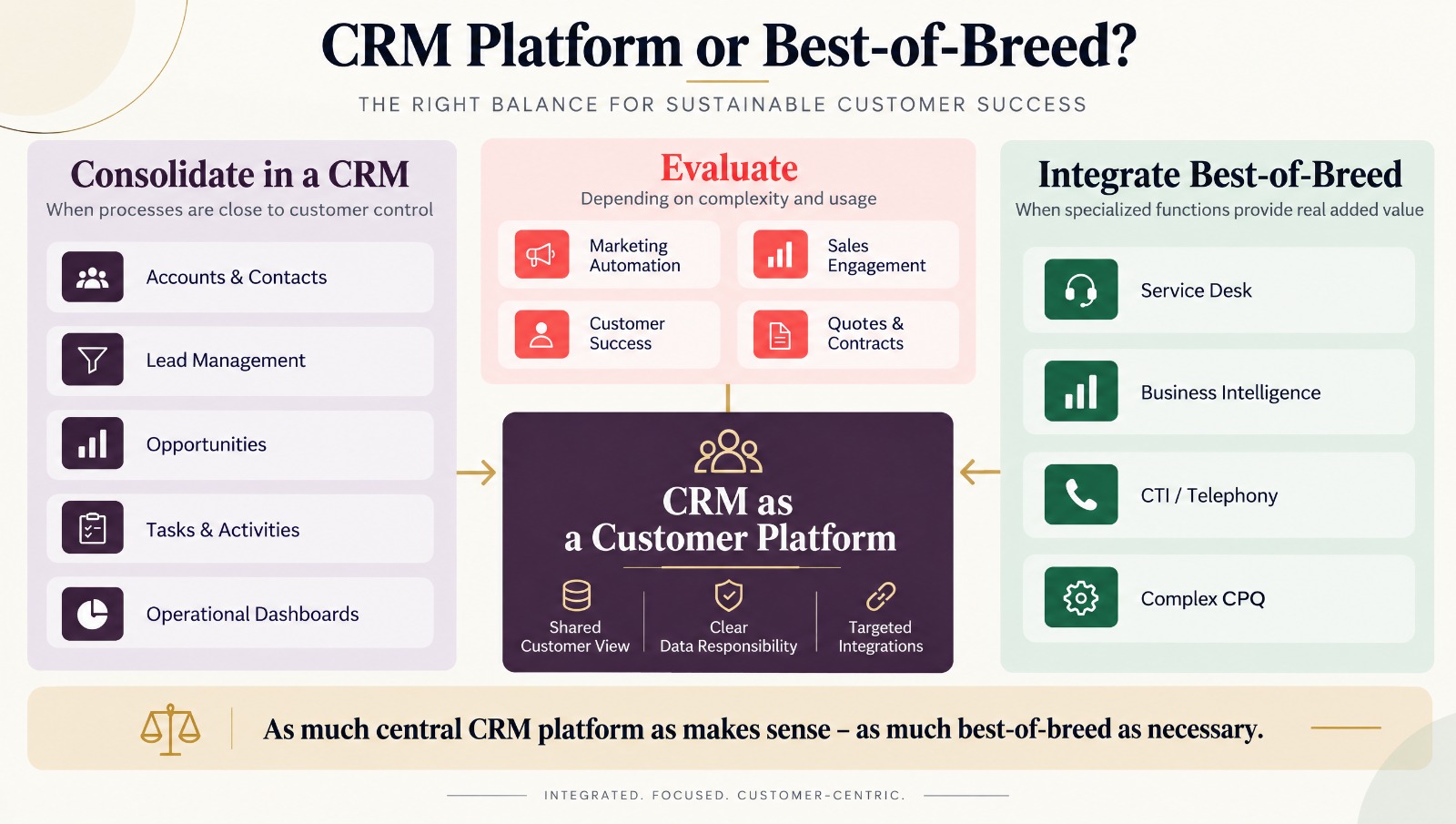
Table of contents
- Checklist: How much consolidation potential is there in your CRM landscape?
- Why CRM system landscapes keep getting more complex
- CRM system landscapes in numbers
- Central CRM platform or best-of-breed?
- Ten areas with consolidation potential
- Compare processes, not functions
- A shared customer view needs clear data ownership
- What does the existing tool landscape really cost?
- Implementing CRM consolidation in phases
- Practical example: Fewer systems, less effort
- What role does AI play in consolidation?
- Conclusion: Fewer tools are not an end in themselves
Checklist: How much consolidation potential is there in your CRM landscape?
Before companies decide to replace individual applications, it is worth taking stock. Often it is not the license costs, but duplicate data maintenance, inconsistent processes or unclear responsibilities that cause the most effort. Not only IT should be involved, but also sales, marketing and customer service. The business units in particular know which functions are actually needed day to day and where unnecessary work arises. The following checklist helps to identify initial weak points and prioritize possible consolidation measures. Anyone who cannot clearly answer several of the following questions should first create transparency before introducing further applications or replacing existing ones.
- Is there a complete overview of all applications that process customer data?
- Are license costs, contract terms and actual user numbers known?
- Do we know which functions of the individual applications are actually used?
- Are there duplicate contact, account or lead data sets?
- Are tasks, activities or workflows managed in parallel in several systems?
- Is it clearly defined which system is responsible for which data?
- Are interfaces and data flows fully documented?
- Can employees view relevant customer information without unnecessary system switches?
- Can individual specialized applications be replaced by existing CRM functions?
- Is the added value of every application that is still needed clearly understood?
- Are data protection, permissions and consents taken into account across systems?
- Are the actual operating and integration costs known?
- Is there a long-term strategy for developing the CRM system landscape?
Why CRM system landscapes keep getting more complex
Most companies did not plan their software landscape as a whole. It has grown over the years, often along the requirements of individual departments. Marketing needed better campaign management and introduced a marketing automation solution. Sales added a sales engagement tool to automate contact sequences and follow-ups. Customer service opted for a specialized service desk, while management introduced additional BI tools for its reporting.
Each of these decisions made sense on its own. It only becomes a problem when the applications increasingly take on the same tasks or manage information independently of one another.
Lead management is a typical example. Marketing automation, CRM and sales engagement often each have their own contact information, status values and automations. If a contact person changes or a lead is qualified, the systems involved have to be informed. If synchronization does not work reliably, the result is contradictory data.
On top of that, software capabilities change over time. Functions that required an additional application five years ago may now be part of the existing CRM platform. Yet the existing system landscape is rarely reviewed to see whether the original reasons for using individual tools still apply at all. The result is an architecture that has grown historically but does not necessarily meet today’s requirements.
CRM system landscapes in numbers
Current studies show how widespread this variety of applications has become. Okta’s Businesses at Work 2026 report finds that companies with fewer than 2,000 employees use an average of 72 applications via the Okta platform. For larger companies, this figure is significantly higher.
The MuleSoft Connectivity Benchmark Report 2026 also highlights the challenges of large system landscapes. According to the report, the German companies surveyed use an average of 920 applications, of which only 24 percent are integrated with one another. At the same time, the range of specialized marketing software has grown to 15,505 products worldwide.
Statistics: Software variety and integration 2026
| Metric | Value | Description |
|---|---|---|
| Average applications at Okta customers with fewer than 2,000 employees | 72 | Okta Businesses at Work 2026; applications used via the Okta platform |
| Average applications at surveyed German companies | 920 | MuleSoft Connectivity Benchmark Report 2026; survey of IT leaders |
| Share of integrated applications at these German companies | 24% | Only some of the existing applications are integrated with one another |
| Marketing technology products recorded worldwide | 15,505 | Marketing Technology Landscape 2026; market offering, not applications per company |
Sources: Okta Businesses at Work 2026, Salesforce/MuleSoft Connectivity Benchmark 2026 and Chiefmartec Marketing Technology Landscape 2026. The studies use different populations and counting methods, so their figures are not directly comparable.
For mid-sized companies with 50 or 100 CRM users, these absolute figures are only of limited relevance. There, the challenge often already lies in sensibly connecting eight to fifteen customer-related applications. The real insight is therefore less the number of programs than the integration effort that comes with every additional application.
Central CRM platform or best-of-breed?
CRM consolidation is often associated with the goal of bringing as many functions as possible together in a single application. At first, that sounds sensible: fewer systems, fewer interfaces, less administrative effort. In practice, however, this approach is not always economical.
A specialized service desk, for example, can support complex service level agreements, escalations and customer portals. Replicating these functions within a general CRM platform could be more costly than continuing to integrate the existing application.
Conversely, there is hardly any justification for managing simple customer tasks, follow-ups or opportunity reports in separate applications when the CRM already provides these functions reliably.
What belongs in the central CRM platform?
The CRM should form the operational basis for managing the customer relationship. This includes in particular accounts, contacts, sales activities, leads, opportunities and the associated tasks. Simple approvals, workflows, lead qualification and operational dashboards can also often be handled directly within the CRM platform. Modern solutions such as SugarAI (formerly SugarCRM), SpiceCRM or SuiteCRM offer different options for this, which can be extended depending on the edition and implementation.
The advantage of a central platform does not lie solely in reducing the number of applications. What matters more is that related information and processes can be handled on a shared data basis.
An account manager, for example, should be able to see at a glance which opportunities are open, when the next customer meeting is due and whether there is currently a critical service case. The service case does not necessarily have to be handled in the CRM for this. It is often enough to make the relevant information from the service desk available.
When best-of-breed remains the better solution
Best-of-breed means using specialized solutions for certain tasks instead of covering all requirements with a single platform. This approach remains sensible when the application offers a clear functional advantage or has to meet special requirements. This often applies to complex marketing automation, contact centers, service management, CPQ, contract management or company-wide business intelligence.
A company with extensive marketing campaigns, several communication channels and complex customer journeys may well benefit more from a specialized marketing platform than from the standard functions of its CRM. However, best-of-breed only works well in the long term if the individual systems are part of a deliberately designed architecture. It is not about mapping everything in the CRM, but about clearly deciding which tasks the CRM takes on and which are better handled by specialized applications.
Ten areas with consolidation potential
When evaluating existing applications, it is worth first looking at the most important functional areas around the customer. Some of them are classic CRM tasks and should be organized centrally wherever possible. Others require specialized software because their requirements go far beyond what a general CRM platform is meant to do. In between are areas where the decision depends heavily on company size, process complexity and existing infrastructure. The following overview shows ten typical starting points and an initial recommendation for consolidation.
| Area | Recommendation | Description |
|---|---|---|
| 1. Customer and contact management | Consolidate in the CRM | Manage accounts, contacts and sales responsibilities centrally. Avoid parallel data maintenance. |
| 2. Lead management | Consolidate in the CRM | Manage lead status, qualification, assignment and handover to sales in one consistent process. |
| 3. Marketing automation | Review the functional scope | Map simple campaigns and workflows in the CRM where appropriate. Use specialized solutions for complex customer journeys. |
| 4. Newsletter and email marketing | Reduce duplication | Separate sending solutions can make sense. Recipient data, consents and unsubscribes must be processed consistently. |
| 5. Sales engagement | Review consolidation | Move simple tasks, follow-ups and reminders into the CRM. Extensive multichannel sequences can justify specialized software. |
| 6. Service desk | Best-of-breed if needed | Handle simple customer requests in the CRM. Integrate specialized solutions for complex ticket processes, SLAs and service portals. |
| 7. Business intelligence | Separate the tasks | Show operational CRM metrics directly in the CRM. Bring company-wide analyses across several data sources together in a BI platform. |
| 8. Telephony and CTI | Integrate a specialized solution | Keep telephony in its specialized infrastructure. Use the CRM integration for caller identification, call documentation and activities. |
| 9. Quotes, CPQ and contracts | Complexity decides | Manage simple quoting processes in the CRM. Keep complex product configuration and pricing in specialized applications where appropriate. |
| 10. Customer success and renewals | Consider extending the CRM | Manage contract terms, renewals and simple health scores in the CRM. Integrate extensive usage analytics if needed. |
These recommendations are deliberately not universal rules. A company with few marketing campaigns may not need a standalone marketing automation platform. For an internationally active provider with different brands, products and target groups, on the other hand, the same solution can be business-critical. The decision should therefore not be made on the basis of the available functions alone, but on the basis of actual requirements and economic benefit.
Compare processes, not functions
When consolidating applications, a feature list is often drawn up first. The CRM offers campaign management, and so does the marketing platform. Both can manage contacts and have lead scoring. So it seems obvious that one of the systems is superfluous. This is exactly where wrong decisions are often made.
Two applications can offer the same function and still implement it very differently. A CRM can support email campaigns, for example, without covering all the requirements of a professional newsletter system in terms of send management, deliverability and recipient management. What matters is therefore not whether a function exists in principle, but whether it adequately supports the actual process.
Example: From marketing contact to sales opportunity
A prospect downloads a white paper and is captured in the marketing platform. There they receive further information, later attend a webinar and are classified as a qualified lead based on their behavior. At this point, the handover to sales takes place.
If the marketing platform and the CRM use different status values or a contact person exists more than once in both systems, problems quickly arise. Sales may receive incomplete information or work on a contact that has already been assigned to another employee. The solution does not necessarily lie in getting rid of the marketing platform.
It often makes more sense to define responsibilities clearly. Marketing is responsible for campaigns and qualification up to the handover, while sales manages the rest of the process in the CRM. A unique lead ID, aligned status values and reliable synchronization ensure that the handover works.
In other cases, however, the analysis shows that a separate application merely sends simple reminders or standard emails. If these tasks can already be handled by existing CRM workflows, there is a lot to be said for consolidation.
Customizing needs to be reviewed too
Not every additional application is the real problem. Sometimes an existing CRM has been customized so heavily over the years that new functions can hardly be integrated anymore. In such cases, it should be checked whether certain processes can be implemented with standard functions again in the future. After all, consolidation must not lead to saved license costs being eaten up again by extensive customizing and its long-term maintenance.
A shared customer view needs clear data ownership
A consolidated CRM landscape does not have to mean that all customer data is stored in a single database. It is far more important to clearly define which system is responsible for which information.
The CRM can, for example, manage accounts, contacts and opportunities, while the ERP remains responsible for invoices, orders and commercial transactions. The service desk keeps the complete tickets, and the marketing platform manages the campaign and communication information required for its processes. The CRM brings together the information that employees actually need to look after customers.
A sales rep, for example, must be able to see that a critical service case is open for an important customer. To do so, however, they do not necessarily need access to all internal notes or technical details of the ticket.
Less synchronization is sometimes more
In integration projects, we repeatedly see companies wanting to exchange as much information as possible between their systems. At first, that sounds like comprehensive integration, but it often leads to unnecessary complexity.
If, for example, address data, status values and contact information are synchronized in both directions, it must be clearly defined which system takes precedence in the event of a conflict. Otherwise, changes overwrite each other or contradictory data sets arise. It should therefore already be clear during planning which data is transferred, in which direction synchronization takes place and how errors are handled. A shared customer view does not come from storing the same data everywhere, but from having the right information available at the right time.
Taking data protection and permissions into account
Consolidation can also offer advantages from a GDPR perspective. Fewer applications often mean fewer data copies, fewer user accounts and clearer processing of personal data. However, centralization must not result in previously separate information suddenly becoming accessible to larger groups of users. Especially for marketing consents, service information and personal contact data, roles, access rights and processing purposes must be properly regulated. Consolidation should therefore always be combined with a review of the data and permission concept.
What does the existing tool landscape really cost?
When assessing cost-effectiveness, license costs usually come first. If an additional application costs 500 euros a month, replacing it seems to allow annual savings of 6,000 euros. However, that is only part of the calculation.
There are also costs for user administration, interfaces, troubleshooting, updates, training and coordination between the various system owners. At the same time, consolidation creates new expenses for migration, process adjustments and possibly additional CRM functions. A comparison of total costs over at least three years therefore makes sense.
A simple cost-effectiveness calculation
Suppose two largely redundant applications cause annual license costs of 12,000 euros in total. Interface maintenance and technical operation add a further 5,000 euros. Consolidation can largely eliminate these costs. The one-off changeover, however, costs 20,000 euros, while the extended CRM functions cause additional annual operating costs of 3,000 euros.
Under these assumptions, the result is annual net savings of 14,000 euros. Mathematically, the investment would pay for itself after around 17 months. Over three years, after deducting the one-off project costs, the benefit amounts to 22,000 euros.
This sample calculation does not yet take into account possible productivity gains from less manual work and assumes that the expected savings can actually be realized. Conversely, replacing a highly specialized application can make no economic sense if its functions would first have to be replicated in the CRM at considerable effort. A good consolidation decision therefore considers not only the licenses saved, but total costs and functional benefit over several years.
Implementing CRM consolidation in phases
Reorganizing a grown system landscape completely in a single project is rarely advisable. The dependencies between applications are often not fully documented. On top of that come historical data, custom interfaces and processes that have become established over the years. A phased approach has therefore proven itself, in which a target architecture is developed first and then implemented step by step.
Phase 0: Create transparency about the existing architecture
It starts with an inventory of all applications that are directly or indirectly involved in customer processes. In addition to license costs, user numbers and contract terms, data sets, interfaces, responsibilities and the functions actually used should also be documented.
The perspective of the business units is also important. Where does information have to be transferred manually? Which data is missing in day-to-day work? Which functions are maintained twice? This analysis alone often shows that some applications hardly deliver any value of their own anymore. The result should be a prioritized overview of possible consolidation measures, supplemented by a realistic target architecture.
Phase 1: Harmonize data and processes
In the next step, it is advisable to improve a limited but important customer process. This could be, for example, the handover of qualified leads from marketing to sales. To do this, duplicate rules are defined first, status values harmonized and the required data fields specified. The integration is then adjusted and tested with real use cases.
This is where the advantage of an agile approach becomes clear: instead of defining all requirements in detail in advance, manageable improvements are implemented, tested with users and adjusted as needed.
Phase 2: Replace redundant applications
Existing applications should only be switched off once the new processes work reliably. Before that, relevant data must be migrated or archived, interfaces adjusted and employees familiarized with the new processes.
Checking for hidden dependencies is particularly important. It is not uncommon for a seemingly superfluous system to still use a workflow or data source that was not considered in the original concept.
Phase 3: Integrate specialized applications in a targeted way
Applications with clear business value remain in place. Their connection to the CRM, however, is simplified and limited to the information that is actually needed. An existing service desk, for example, can continue to manage all ticket processes, while the CRM only takes over relevant status information and customer-related metrics. This reduces technical complexity without affecting proven processes.
What matters is that each project phase ends with a verifiable improvement. This creates not just a new architecture on paper, but an overall system that is optimized step by step.
Practical example: Fewer systems, less effort
A typical scenario from the world of mid-sized B2B companies shows what such a consolidation can look like. The following example is deliberately simplified; the figures are illustrative values that show how the benefit of such a project can be measured.
An IT service provider with around 80 CRM users runs various applications alongside its CRM for marketing automation, newsletters, sales engagement, service management, reporting and contract renewals. The individual systems work largely reliably. Nevertheless, the administrative effort is increasing because customer data has to be maintained several times and different applications perform similar tasks. This becomes particularly clear in lead handover and the management of contract renewals.
Marketing uses different status values than sales. Follow-ups are managed both in the CRM and in a separate sales engagement solution. Contract terms are kept in yet another application, even though the associated accounts and opportunities already exist in the CRM.
Step by step to a leaner architecture
In the first phase, the contact data is cleaned up and consistent lead status values are introduced. At the same time, tasks and follow-ups are brought together in the CRM.
In the second phase, the functions of the sales engagement tool that are no longer needed are replaced by CRM workflows. The application can then be switched off. After that, contract renewals and the associated tasks are moved into the existing CRM process.
The service desk and the marketing automation platform, on the other hand, remain in place, as both fulfill important specialized functions. Their interfaces are merely reworked so that relevant information is available in the CRM. Each phase is tested with the business units concerned. Adjustments are made based on feedback from live operation.
How success can be measured
Instead of simply counting the applications that have been switched off, several operational metrics are considered.
| Metric | Before | After |
|---|---|---|
| Active applications around the customer | 8 | 6 |
| Active technical integrations | 10 | 7 |
| Manual data reconciliation | 11 hours/week | 4 hours/week |
| Processing effort per lead handover | 22 minutes | 9 minutes |
| Duplicate rate for contacts | 9% | 3% |
Illustrative model values to show possible project results.
The benefit of such a consolidation does not lie solely in the fact that two applications are dropped. Employees spend less time on manual data maintenance. Leads are handed over faster and more reliably, while management can access more consistent customer information. At the same time, the specialized applications that perform their tasks better than a general CRM function are retained. It is precisely this combination that is decisive: reducing complexity without unnecessarily changing processes that work.
What role does AI play in consolidation?
With the increasing use of AI agents, the architecture of the CRM system landscape becomes even more important. An AI agent that, for example, analyzes customer information, prepares meetings or carries out tasks across several systems needs reliable data and controllable interfaces. If customer data is spread across different applications and individual pieces of information contradict each other, automated processing also becomes more difficult.
Modern integration approaches such as APIs or the Model Context Protocol (MCP) make it possible to open up CRM and specialist systems to AI applications. This can certainly be an argument for continuing to run specialized applications instead of replicating all functions in one platform. What remains decisive, however, is that data ownership and access rights are clearly defined.
An AI agent should not, for example, be allowed to process more customer information because of far-reaching technical access rights than the user on whose behalf it acts. This is another reason why it is worth simplifying the existing CRM landscape before introducing additional AI applications. A clear system architecture is not only helpful for employees, but also forms the basis for AI agents to access company data and processes reliably and in a controlled way.
Conclusion: Fewer tools are not an end in themselves
Consolidating a CRM landscape should not start with the goal of getting rid of as many applications as possible. What matters instead is whether the systems in use jointly support a functioning customer process and how much effort they cause in doing so.
Modern CRM platforms can take on numerous tasks that used to be handled in separate applications. At the same time, specialized solutions remain useful where they offer clear functional or economic added value. The challenge lies in drawing this line deliberately.
Those who regularly review their existing software landscape, clearly define data ownership and question redundant functions can reduce both operating costs and organizational complexity. A phased approach is generally more sensible than a complete reorganization in a single project. Our recommendation: as much central CRM platform as makes sense, as much best-of-breed as necessary.
We help companies analyze their existing CRM system landscape, identify consolidation potential and develop an architecture that is economical in the long term – from the initial inventory through the integration of existing applications to step-by-step implementation.