CRM systems today hold an astonishing amount of information. They know customers, contacts, opportunities, activities, service cases, contracts, and often data from ERP, marketing, or other connected systems as well. The real problem is therefore often no longer that information is missing, but getting to it.
A sales rep comes out of a customer meeting and has to open the contact, record a note, update the opportunity, create a follow-up task, and perhaps schedule another appointment. A sales manager wants to know which large deals have been stalled for two weeks and starts with a report, filters, and an export. A service agent first needs the customer’s full context before an escalation. All of these tasks can be done, but they create click work.
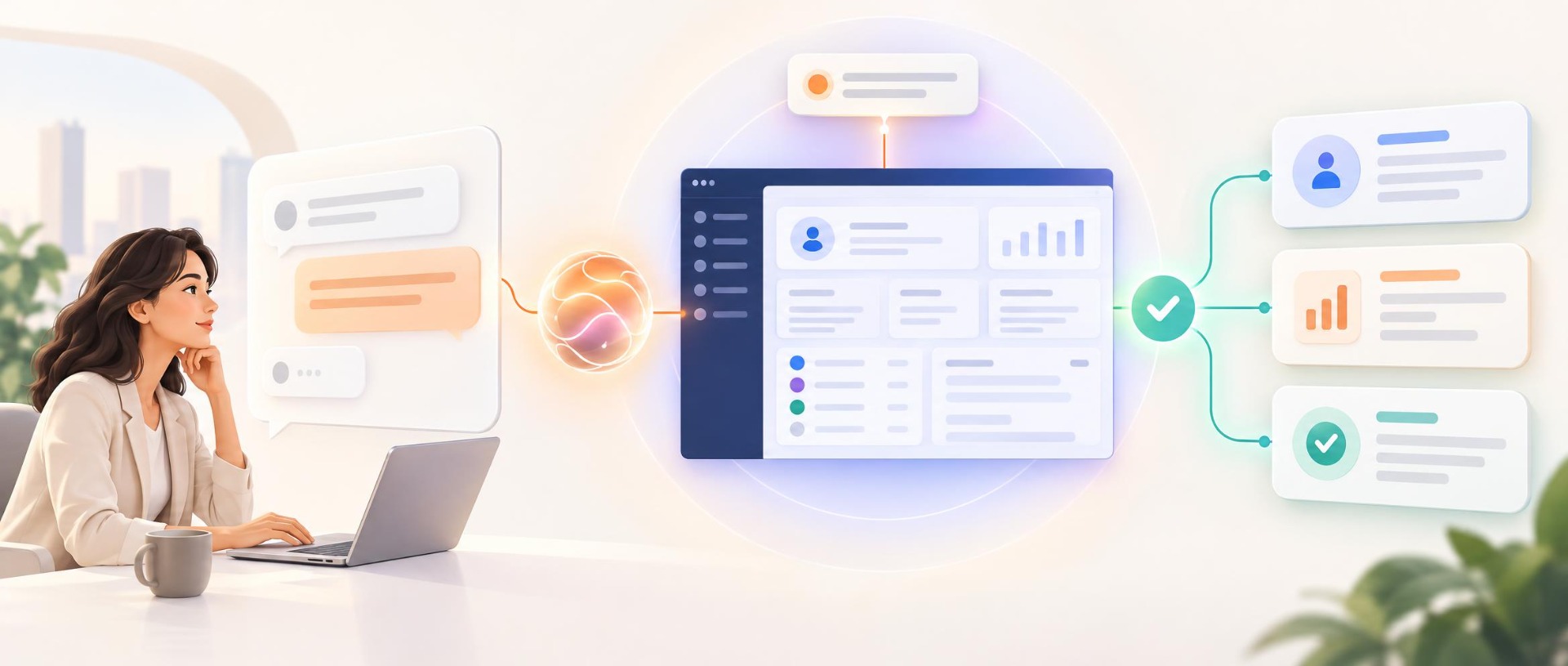
Agentic AI changes exactly this part of CRM usage. Instead of carrying out every single step in the system themselves, users describe the result they want. An agent finds the necessary information, prepares actions, and carries out defined steps within clear limits. This raises a new question for CRM owners: What if employees no longer had to learn how to find or enter every piece of information in the CRM – but could simply tell the CRM what they need?
From system of record to active work system
For a long time, CRM was understood above all as a central database. The system stores customer information and makes it available through screens, lists, dashboards, and reports. That remains important, but agentic AI adds a new layer.
A classic CRM waits for a user to start an action. An agent, on the other hand, can recognize context, connect several steps, and even reach out on its own when defined events occur. CRM is thus gradually evolving from a pure system of record into a system of action. The difference can be shown with a simple sales task. After a customer meeting, an employee might have to:
- open the customer record,
- log the meeting,
- create a call note,
- update the opportunity,
- schedule a task for the quote.
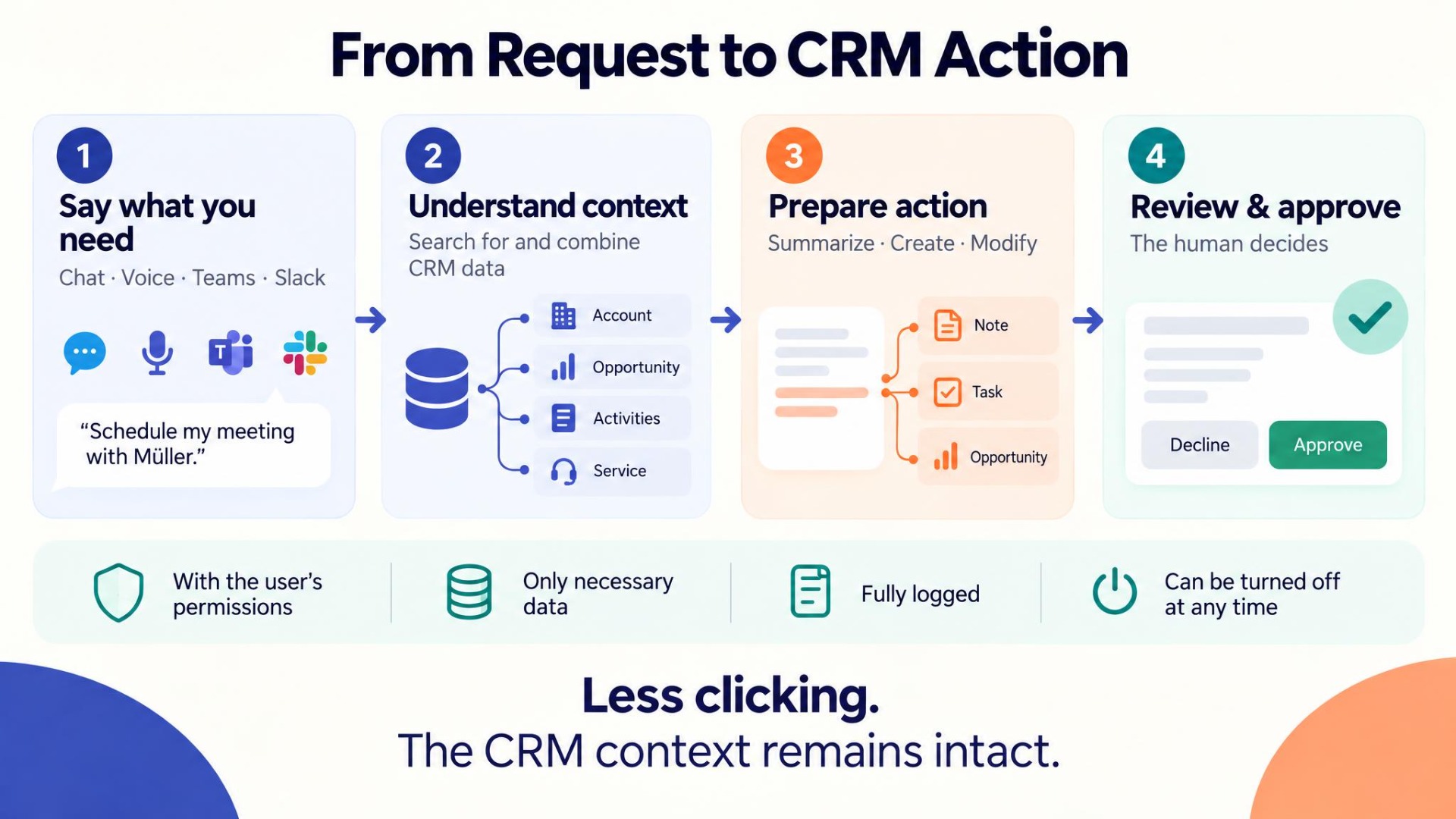
That is five separate steps across several screens. With a suitable CRM agent, a single message could be enough instead:
“Meeting at Müller went well. They want 40 licenses. Quote by Friday.”
The agent extracts the relevant information and prepares the meeting log, note, follow-up task, and opportunity update. The employee reviews the result and approves it. The business decision stays with the human, while the system takes over the click work.
Assistant, workflow, or agent – what is the difference?
Not every automation needs an AI agent. A classic workflow is still an excellent fit when the process is clearly defined. If, for example, the same task should always be created after a status change, no artificial intelligence is needed. An AI assistant, in turn, can summarize information or draft texts without taking over a longer process itself. An agent goes one step further: it is given a goal, determines the necessary information, and uses the available tools to prepare or carry out several steps.
| Technology | Typical task | Example in the CRM |
|---|---|---|
| Classic workflow | Execute a fixed rule | Automatically create a task after a status change |
| AI assistant | Analyze or generate information | Summarize an opportunity |
| AI agent | Understand a goal and coordinate several steps | Evaluate a customer meeting, update the CRM, and prepare a follow-up |
| Proactive agent | Monitor events on its own | Flag stalled deals, deadlines, or SLAs at risk |
The right architecture is therefore not about using agents everywhere possible. Good CRM automation combines classic workflows, AI support, and agentic processes wherever each delivers the greatest benefit.
The biggest lever often lies in everyday CRM tasks
When it comes to agentic AI, the conversation quickly turns to highly autonomous systems. In CRM, however, the practical benefit initially often lies in much less spectacular tasks. It is precisely the small activities, repeated many times every day, that add up.
1. Preparing the working day
In the morning, an agent can compile appointments, open tasks, expiring quotes, and opportunities that need attention. Instead of opening several dashboards, the employee receives a compact briefing.
This becomes especially interesting when the briefing does not just list data but makes priorities visible: a quote expires tomorrow, an important customer has an open service case, or an opportunity has had no next step for three weeks.
2. Following up on customer meetings
After a conversation, a few sentences or even a voice message are often enough. From this, the agent can prepare, for example:
- a call note,
- a follow-up task,
- the next step,
- an adjusted close date,
- an updated opportunity stage.
Field sales staff in particular no longer have to work through several CRM screens on their smartphone after a customer meeting.
3. Understanding the customer before a meeting
Before an important conversation, the agent can bring together information from several areas of the CRM:
- recent activities,
- open opportunities,
- service cases,
- contacts,
- contracts,
- open tasks,
- latest communication.
The result is not yet another report, but a concrete customer dossier for the upcoming meeting.
4. Monitoring opportunities
A sales manager does not have to check every deal individually. An agent can regularly look for patterns:
- no activity for a long time,
- close date passed,
- no documented next step,
- unusually long sales cycle,
- key contacts missing.
This shifts the use of CRM reports from pure hindsight to active management.
Marketing and service benefit too
Agentic CRM processes are not just a sales topic. In marketing, for example, an employee could describe a target group in natural language:
“Mechanical engineering in Bavaria, subscribed to the newsletter, no contact for six months.”
The agent translates this description into a CRM query, shows the records found, and, once approved, can create a target group from them. Trade fair and event processes are also well suited. Attendee lists or information from documents can be checked, matched against existing contacts, and prepared as leads.
In service, the levers are different: a new case can be automatically enriched with customer history, contract, and SLA context. Similar cases that have already been solved can be found and reply drafts prepared. For critical cases, the agent can warn early, before an SLA is actually breached. AI thus does not work alongside the CRM, but uses the existing customer context.
Proactivity is the real difference
Chatting with company data now comes in many variants. Agentic systems become particularly interesting when employees do not have to start every action themselves. An agent could, for example, recognize that:
- an important meeting is in one hour,
- a quote expires tomorrow,
- a large opportunity has had no activity for 14 days,
- a service case is approaching its SLA limit,
- the data of a strategic account is incomplete.
It then reaches out to the responsible employee on its own. This fundamentally changes the interaction. The CRM no longer waits exclusively for the user, but observes defined business situations and draws attention to where action is needed. However, it is important to use this proactivity in a targeted way. If an agent reports every little thing, the result is merely a new form of notification stress. Companies therefore need to define which situations are actually relevant and when the agent should stay quiet.
A good agent needs limits
The most interesting question is not whether an agent can technically carry out an action, but rather: Is it allowed to? Not every task needs the same degree of autonomy. A pragmatic model distinguishes, for example, four levels.
Read only
The agent researches, answers questions, creates lists, or summarizes information. It changes nothing in the CRM. This is a sensible starting point, because employees can first experience how reliably the agent works with their data.
Suggest
The agent prepares changes. The employee sees exactly what would be changed and then approves the action. This level is suitable, for example, for call notes, opportunity updates, or follow-up tasks.
Autonomous internally
Well-defined, low-risk processes can later run automatically. These can include internal briefings, data checks, or alerts for certain deadlines.
With customer contact
Here the risk rises significantly. An agent communicates directly with the outside world or carries out actions that affect customers. Such processes should only be used once internal processes are stable and clear rules exist for transparency, escalation, and human takeover. Development should therefore not start with maximum autonomy, because trust is built through the controlled expansion of what the agent is allowed to do.
The agent must not see more than the user
A key prerequisite for agentic CRM processes is a clean permission model. If a sales rep is not allowed to see certain customer data, their agent should not have access to it either. The same applies to sensitive information such as internal margins, confidential contract information, or other teams’ data. Technically, this means the agent should not work through a powerful shared account, but within the context of the respective user’s permissions. In addition, only the data actually needed should be used for each task. Ultimately, the same basic principles apply to digital agents as to human users:
- only necessary permissions,
- only necessary data,
- traceable actions,
- clear accountability.
Logging becomes more important, not less
The more an agent is allowed to do, the more important traceability becomes. Companies should later be able to answer:
- Who gave the instruction?
- Which data was used?
- What did the agent suggest?
- Who approved the action?
- What was actually changed in the CRM?
- When was the change made?
Especially with automatically executed processes, autonomy must therefore not be confused with a lack of transparency. A good agent should be less of a black box than some of today’s manual processes.
The technical idea: the existing CRM stays
For many companies, it is important that agentic AI does not automatically mean replacing the existing CRM. The more sensible architecture is often an additional agentic layer. Users communicate, for example, via:
- Microsoft Teams,
- Slack,
- a chat directly in the CRM,
- email,
- voice.
The agent interprets the request and then uses defined CRM tools to search, read, create, or change information. The actual CRM remains the leading system. This approach has a decisive advantage: companies do not have to move their existing processes and data into a new AI application. The agent works with the existing CRM structure. Agentic AI can thus be added step by step, instead of rebuilding the entire system landscape.
Which tasks are best suited to start with?
Not every process is a good first use case. Tasks are particularly well suited for getting started if they have several of the following characteristics:
- they occur frequently,
- they cause a lot of manual work today,
- the necessary data is already available digitally,
- the desired result can be clearly described,
- errors are easy to spot or undo,
- the benefit can be measured.
The following overview shows typical tasks to which these characteristics often apply in practice:
| Area | Use case | Typical benefit |
|---|---|---|
| Sales | Daily briefing | Less time spent on preparation |
| Sales | Customer dossier | Context available faster before meetings |
| Sales | Meeting follow-up | Less manual CRM maintenance |
| Sales | Detect stalled opportunities | Risks visible earlier |
| Marketing | Create target groups by voice or text | Less complex filtering work |
| Marketing | Prepare leads from events | Faster handover to sales |
| Service | Summarize cases | Faster familiarization with cases |
| Service | Draft replies | Less repetitive writing |
| Service | Detect SLA risks | Earlier escalation |
| Cross-team | Ask questions of CRM data | Information accessible without building reports |
The choice should not be based on which use case looks most impressive technically. What matters is where friction actually arises in day-to-day work.
Where an agent is not the right solution
Agentic AI is no substitute for clean processes. If a process is clearly and completely rule-based, a classic workflow often remains simpler, cheaper, and more reliable. Poor CRM data does not automatically become good through an agent either. If contacts are missing, opportunities are outdated, or products are maintained inconsistently, even the best agent works with incomplete context. The same applies to organizational ambiguity. If nobody knows who is responsible for an opportunity, AI cannot permanently replace that decision. Before an agent project, it is therefore worth checking: Is the problem really a lack of intelligence – or first of all a lack of process clarity?
Step by step instead of big bang
The most sensible starting point is rarely an agent that independently writes to customers and changes CRM data from day one. A controlled expansion works better.
Phase 1: Select a specific process
First, it is clarified where time is actually being lost and what benefit is expected.
Phase 2: Read and understand
Initially, the agent only receives read access and answers questions or creates briefings.
Phase 3: Prepare suggestions
It is then allowed to prepare changes that an employee approves.
Phase 4: Automate clearly defined processes
Only once results are reliable can suitable internal processes run autonomously.
Phase 5: Expand
After that, further teams, data areas, and tasks can be added. This way, an AI experiment gradually becomes a productive part of CRM operations.
What we built from this with GoAgentic
This is exactly the thinking behind GoAgentic at MyCRM. The idea is not to place yet another CRM or an additional general-purpose chatbot alongside the existing system landscape.
GoAgentic adds an agentic layer to existing SugarAI, SpiceCRM, and SuiteCRM installations. Users can formulate tasks in natural language via Teams, Slack, the CRM chat, or other connected channels. Which tasks the agent takes on is not predefined across the board. Together, we analyze which processes actually make sense in the respective company. For one company, that can be a morning sales briefing; for another, the greater benefit may lie in service classification, data quality, or following up on customer conversations. Autonomy is also defined step by step. An agent can only read, prepare changes for approval, or later take over certain internal processes on its own. The aim is not to automate as much as possible, but to eliminate exactly the clicking and searching that costs time today without requiring a business decision.
A possible practical example
Let us take a sales rep with three customer meetings in one day. In the morning, they automatically receive a short briefing with appointments, open tasks, and a quote whose deadline is approaching. Before the first meeting, they ask:
“What should I know about Müller GmbH today?”
The agent summarizes opportunities, recent communication, and open service cases. After the meeting, on the way to the car, the rep records a short message:
“Meeting went well. Interested in 40 licenses. Quote by Friday.”
From this, the agent prepares the CRM note, follow-up task, and updated opportunity. In the afternoon, the system flags another large opportunity on which no activity has been logged for more than two weeks. At the end of the day, the rep plans their next calls with a single message. None of these steps is spectacular on its own – but that is exactly where the benefit lies: many minutes of click work disappear from individual situations. Across many employees and working days, this adds up to a relevant productivity gain – while the information still ends up in the CRM in a structured way.
Conclusion: The best CRM interface could soon be a conversation
CRM interfaces will not disappear. For administration, complex data maintenance, and detailed analyses, structured views remain important, but many everyday tasks do not actually need a screen.
An employee does not necessarily want to know in which module and which subpanel a piece of information is stored. They want to know which opportunities are at risk, what last happened with a customer, or what needs to be done next after a conversation. Agentic AI can take over exactly this layer between people and the CRM. This does not replace the CRM, it makes it easier to access.
The interesting development therefore lies less in the fact that AI can write texts. What matters is that it can understand CRM context, use tools, and connect several work steps within defined limits. For companies, it is now worth not to start with the question “Where can we use AI everywhere?”, but rather with this one: “Which CRM work costs our team time every day even though it hardly requires a human decision?” That is often exactly where the best first use case lies.
Would you like to see how an agent could work with your CRM processes?
With GoAgentic, we work with you to develop a concrete use case for SugarAI, SpiceCRM, or SuiteCRM – from the initial needs assessment through a proof of concept to pilot operation. We start with clear limits and measurable success criteria. Only once the benefit is visible in your own process do we take the next step.