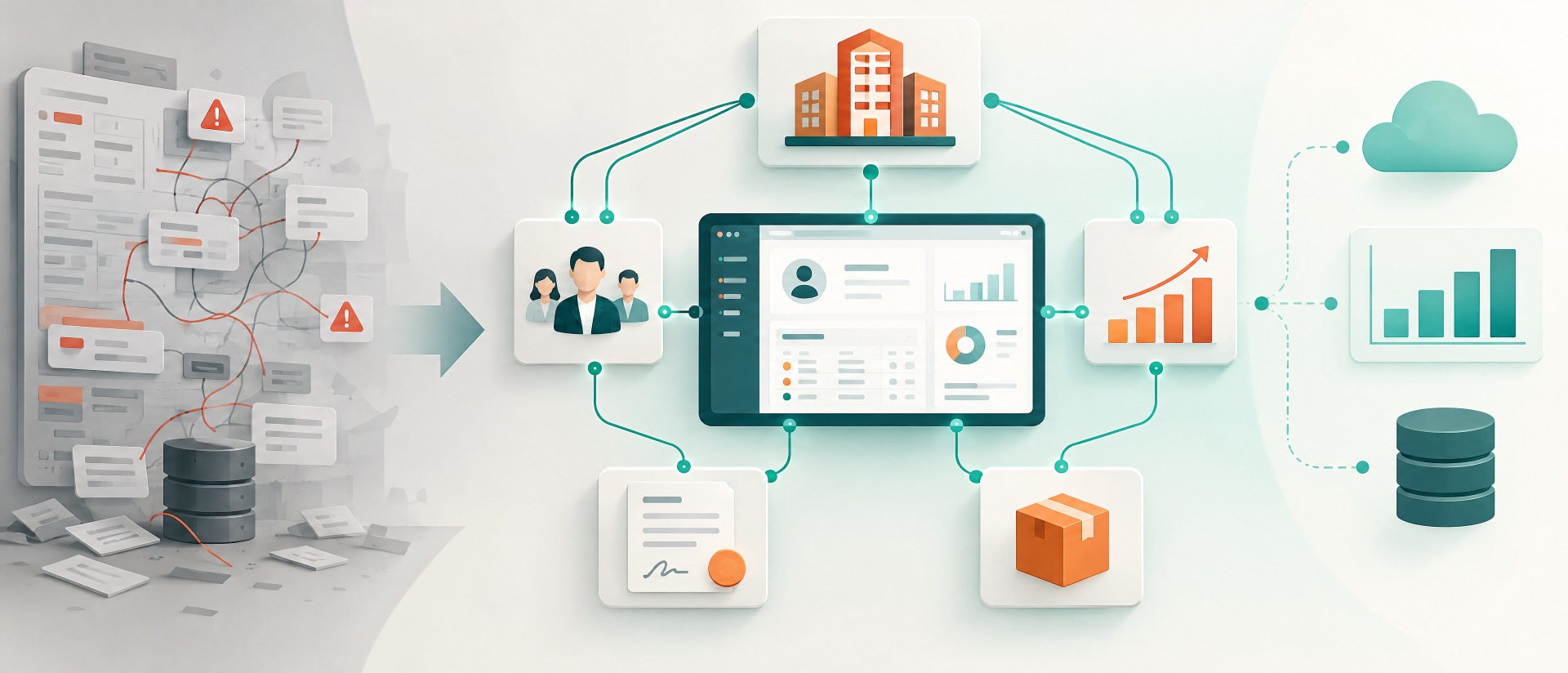
At first glance, a CRM data model looks like a technical detail. Accounts, contacts, opportunities, activities, a few additional fields – done.
In practice, however, the data model determines how well a CRM will still work in two, five, or ten years.
Anyone who models the relationships between customers, contacts, locations, contracts, projects, or partners incorrectly often does not notice the consequences at go-live. The problems arise later: reports become complicated, integrations need special logic, users maintain the same information multiple times, and new processes can only be mapped with workarounds.
A good CRM data model therefore does not simply replicate existing Excel tables. It translates the business model into a structure that remains understandable, analyzable, integrable, and extensible.
What is a CRM data model?
The CRM data model defines which business objects exist in the CRM and how they are connected to one another.
Typical objects include, for example:
- Companies / accounts
- Contacts
- Leads
- Opportunities
- Products
- Quotes
- Contracts
- Projects
- Service cases
- Locations
- Partners
- Assets or installed products
What matters, however, is not only which objects exist.
At least as important are their relationships.
An account can, for example, have several contacts. An opportunity can be assigned to several contacts. A corporate group can consist of several legally independent accounts. A contract can cover several products and locations.
It is precisely these relationships that later determine which questions the CRM can answer.
The data model is the business logic beneath the interface
CRM projects understandably focus heavily on user interfaces.
Which fields should be on the screen? Which information does sales need? What does the dashboard look like?
These questions are important. But they sit one level above the actual problem.
Beneath the interface, it must be clarified:
What actually is a customer?
Is the customer:
- a legal entity,
- a corporate group,
- a location,
- a department,
- a contracting party,
- or a combination of these?
This question sounds trivial but can have considerable consequences.
A mechanical engineering company, for example, sells to a corporate group with 40 locations. Invoices go to a central entity, but the machines are located at individual plants and service is provided locally.
If everything is managed as one account, the location perspective is missing.
If, on the other hand, 40 completely independent accounts are created, the group-level view may be lost.
A good data model must enable both perspectives.
Why poor data models often work at first
The dangerous thing about a poor CRM data model is this: at first it often works surprisingly well.
With 500 customers, three sales employees, and few processes, almost everything can be solved with additional fields.
A “Contract runs until” field works.
A “Partner” field works.
A “Location” field works.
A “Product 1” field works as well.
The problems only arise when the company grows.
What happens, for example, when a customer:
- has five contracts,
- has ten locations,
- uses 25 products,
- involves two partners,
- has different contacts per product,
- has several ongoing projects?
Now a single field is no longer enough.
The CRM needs its own objects and relationships.
The decisive design question is therefore not only:
“Does this work today?”
But rather:
“Will this structure still work when one record becomes ten?”
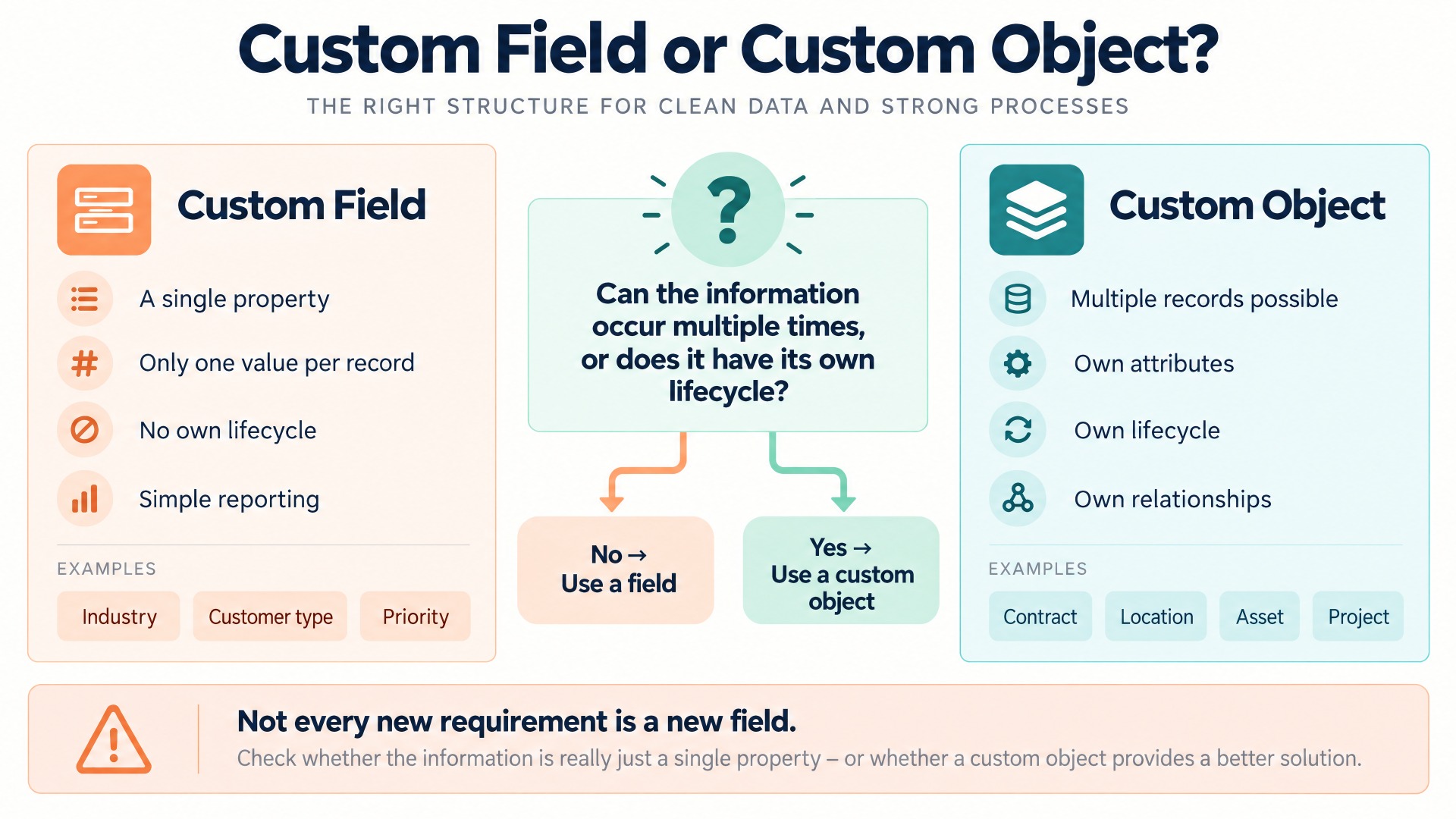
Custom field or a dedicated CRM object?
This is one of the most important decisions in CRM projects.
Not every new piece of information needs its own module. At the same time, not every requirement should be squeezed into an additional field either.
A helpful rule of thumb is:
If a piece of information has its own lifecycle, several attributes, or several occurrences per record, it should be checked whether it needs its own object.
An example:
A company wants to store contract information in the CRM.
A simple solution could be:
- Contract number
- Contract start
- Contract end
- Contract value
as fields directly on the account.
This works as long as every customer has exactly one contract.
As soon as several contracts can exist, the structure becomes problematic.
Then a dedicated “Contract” object would usually make more sense.
Each contract can then hold its own information:
- Contract number
- Start date
- End date
- Status
- Value
- Notice period
- Products
- Contacts
- Documents
And an account can be linked to several contracts.
Relationships matter more than additional fields
Many CRM systems easily allow hundreds of additional fields. Technically, that is simple. Architecturally, it is often not the best solution.
A CRM gains its value above all through relationships.
A contact belongs to a company.
An opportunity concerns a customer.
An opportunity can include several contacts.
A service case may concern a specific product at the customer.
A partner may influence an opportunity.
A project is based on a won opportunity.
When such connections are modeled as real relationships, new analysis options arise.
The CRM can then answer, for example:
- Which products does this customer own?
- Which service cases were there for this product?
- Which contacts are involved in a contract?
- Which opportunities were influenced by a specific partner?
- Which projects arose from won opportunities?
If the same information is stored only in text or dropdown fields, these relationships are lost.
Distinguishing 1:n and n:m correctly
An important design decision concerns the cardinality of a relationship.
1:n – One record to many others
Example:
An account has several contacts.
This is usually a classic 1:n relationship.
n:m – Many records on both sides
Example:
Several contacts can be involved in several opportunities.
Then an n:m relationship makes sense.
The same often applies to:
- Opportunities ↔ partners
- Contacts ↔ projects
- Products ↔ contracts
- Accounts ↔ corporate groups
- Employees ↔ customer roles
n:m relationships in particular are frequently underestimated in early CRM concepts.
Later, additional fields such as “Partner 1”, “Partner 2”, and “Partner 3” are therefore introduced.
This works in the short term but scales poorly.
When the relationship itself holds information
It becomes even more interesting when not only the two records are relevant, but also the relationship between them.
Example:
An opportunity is linked to a partner.
In addition, the following should be stored:
- Role of the partner
- Date of involvement
- Sourced or influenced
- Commission rate
- Deal protection
- Collaboration status
Then a simple relationship is often no longer sufficient.
The relationship itself needs data.
In such cases, a dedicated intermediate object can make sense, for example:
Opportunity Partner
This object connects the opportunity and the partner and stores additional information about exactly this relationship.
This principle is extremely valuable for more complex CRM data models.
The ten most important building blocks of a sustainable CRM data model
| No. | Building block | Key question | Typical benefit |
|---|---|---|---|
| 1 | Clear business objects | Which real-world things must be managed independently? | Prevents overloaded standard modules |
| 2 | Clear definitions | What do account, lead, opportunity, or customer mean? | Consistent usage across the company |
| 3 | Clean relationships | Which objects belong together from a business perspective? | Better 360° view and analyses |
| 4 | Correct cardinality | 1:1, 1:n, or n:m? | Prevents later structural problems |
| 5 | Dedicated objects instead of field collections | Can the information occur multiple times or does it have a lifecycle? | Better scalability |
| 6 | Clear status models | Which states can an object pass through? | Automatable processes |
| 7 | Ownership | Who owns and maintains the record? | Higher data quality |
| 8 | System-of-record principle | Which system is leading for which data? | More stable integrations |
| 9 | Reporting capability | Which questions must be answered later? | Prevents costly reporting workarounds |
| 10 | Extensibility | Which future processes are likely? | Less custom development later |
Status fields are part of the data model too
Objects and relationships are not the only parts of the data model.
Status and lifecycle models must also be defined cleanly.
A lead could, for example, have the following phases:
New → In progress → Qualified → Disqualified → Converted
A partner:
Prospect → Qualification → Onboarding → Active → Inactive
A contract:
Draft → Active → Renewal → Terminated → Ended
The problem begins when status values simply grow historically.
After a few years, for example, the following then exist:
- New
- Open
- In progress
- Processing
- Active
- Activated
- Waiting
- On hold
- Deferred
without a clearly defined meaning.
This makes automation and reporting unnecessarily complicated.
Every status should therefore have a clear business meaning.
The data model must consider reporting from the start
A good question during CRM design is:
“Which management questions must we be able to answer later?”
For example:
- How much pipeline do we have per customer group?
- Which products are used at which customers?
- Which opportunities are linked to expiring contracts?
- Which partners influence our revenue?
- Which customers have open service cases and renewal potential at the same time?
- How does an account develop across several legal entities?
If such questions are only asked after go-live, it sometimes turns out that the required connections are not stored in a structured way at all.
Then reporting is produced through:
- helper fields,
- exports,
- special SQL logic,
- data warehouses,
- manual assignments.
Reporting should therefore not be considered only at the end of the project.
Reporting begins with the data model.
CRM and ERP: Who owns which data?
Another problem often arises with integrations.
CRM and ERP partly store the same information:
- Company name
- Address
- Customer number
- Products
- Prices
- Contacts
- Orders
- Invoices
The decisive question is therefore not:
“Which data do we synchronize?”
But first:
“Which system is the leading one for which information?”
For example:
| Data area | Typical leading system |
|---|---|
| Leads | CRM |
| Opportunities | CRM |
| Sales activities | CRM |
| Customer number | ERP |
| Invoices | ERP |
| Delivery status | ERP |
| Communication history | CRM |
| Service cases | CRM or service platform |
The actual model of course depends on the respective system landscape.
What matters is unambiguity.
If CRM and ERP are allowed to change the same information independently at the same time, conflicts arise sooner or later.
Distinguishing master data and transactional data
Another helpful distinction exists between master data and transactional data.
Master data changes comparatively rarely:
- Company name
- Industry
- Postal address
- Customer number
- Contacts
- Product definitions
Transactional data arises continuously:
- Opportunities
- Activities
- Quotes
- Orders
- Service cases
- Interactions
This distinction helps in particular with integrations, permissions, historization, and data archiving.
Do not underestimate company hierarchies
In B2B CRM, account hierarchies are among the frequently underestimated requirements.
An international customer can, for example, consist of:
Global Holding
↓
Deutschland GmbH
↓
Stuttgart plant
↓
Production department
At the same time, contacts, opportunities, contracts, and service cases exist at different levels.
Management may want to see the total group revenue.
The account manager, by contrast, is interested in Germany.
The service employee needs the individual location.
It should therefore be clarified early:
- Which hierarchy levels do we need?
- Where are opportunities attached?
- Where are contracts attached?
- Where is revenue aggregated?
- Which level does the contact belong to?
- How is the group-level view established?
Rebuilding such structures afterward is considerably more laborious than clean modeling early on.
Duplicates are often a data model problem too
Duplicates are usually regarded as a data quality problem.
In part, however, they are a symptom of an unclear model.
If no one knows whether branches are separate accounts or just addresses of an existing account, different records inevitably arise.
If a “customer” is understood once as a corporate group and once as a legal entity, even perfect duplicate rules cannot fully solve the problem.
Data quality therefore begins with a clear definition of the objects.
Roles do not belong in free-text fields
Especially in B2B CRM, contacts can have different roles.
A contact can be:
- Decision-maker
- Technical contact
- Purchasing
- Champion
- User
- Contract contact
- Invoice recipient
What is decisive here:
A person can have different roles in relation to different opportunities or contracts.
A contact can be the decision-maker for opportunity A and merely the technical contact for opportunity B.
The role therefore does not necessarily belong on the contact as a fixed field.
In more complex models, it can be a property of the relationship between contact and opportunity.
This is a classic example of why good data modeling goes beyond simply creating fields.
CRM: Using flexibility sensibly
Platforms such as SugarAI or SpiceCRM offer extensive options to extend existing modules, create additional fields, build relationships, and map their own business structures.
Precisely this flexibility is valuable.
But it also carries a risk.
Just because a new field can be created quickly does not automatically mean that a field is the right business solution.
Before customizing, the question should therefore always be asked:
Is this an additional property of an existing object – or is a new business object actually emerging here?
A dedicated data type or module initially causes more modeling effort. In the long term, however, it can considerably simplify reporting, workflows, permissions, and integrations.
AI makes a good CRM data model even more important
With AI, the topic becomes even more important.
An AI assistant can summarize CRM information.
An agent may be able to prepare meetings, identify opportunity risks, or suggest next steps.
But the quality of these functions depends on the context.
If, for example, the following is clearly structured:
- which products a customer owns,
- which contracts are active,
- which contacts play which roles,
- which opportunities are in progress,
- which service problems exist,
AI can work much more precisely.
If, on the other hand, the same information is spread across free-text fields, notes, attachments, and unlinked records, the AI must first try to reconstruct the connections.
A good data model is therefore also a foundation for an AI-ready CRM.
Typical mistakes in CRM data models
| Mistake | Short-term effect | Long-term consequence |
|---|---|---|
| Too many custom fields | Implemented quickly | Cluttered screens and poor scalability |
| Multiple values in one field | Easy to maintain | Hardly analyzable in a clean way |
| Partner 1 / Partner 2 / Partner 3 | Works at first | Rigid model when more parties are involved |
| No account hierarchy | Less complexity | No reliable group-level view |
| Status values without definition | Flexible | Inconsistent reporting |
| CRM and ERP without data ownership | Quick integration | Synchronization conflicts |
| Free text instead of relationships | Quick data entry | Missing automation and analysis |
| Everything in the account module | Few modules | Overloaded records |
| Planning reporting only after go-live | Quick project start | Costly rework |
| Modeling only today’s requirements | Small initial project | Early structural rebuild |
Practical example: From an overloaded account to a scalable model
A mid-sized B2B company has been using its CRM for several years.
The account now has more than 150 custom fields.
Among them:
- Contract start
- Contract end
- Product group
- Installed solution
- Location
- Project status
- Service level
- Partner
- Renewal date
Originally, this model worked because most customers had only one contract and one location.
The business model, however, is evolving.
A customer can now have several contracts, locations, and solutions. In addition, customer success and partner sales are being built up.
The problem:
A single contract-end field can no longer map that three contracts expire on different dates.
A single partner field cannot show that several partners take on different roles in different opportunities.
And a single product field does not deliver a real installed-base view.
The company therefore revises the data model.
| Phase | Change to the data model | Result |
|---|---|---|
| Phase 1 | Contract fields are replaced by a dedicated “Contract” object. | Several contracts per customer can be managed cleanly. |
| Phase 2 | Installed products are modeled as assets or customer products. | Installed base, service, and cross-selling become easier to analyze. |
| Phase 3 | Locations are linked to accounts in a structured way. | Group and location perspectives can be viewed separately. |
| Phase 4 | Partners are linked relationally with opportunities. | Several partners and different roles can be mapped. |
| Phase 5 | Reporting and workflows are built on relationships instead of helper fields. | Less special logic and better extensibility. |
The result is not necessarily a CRM with less data.
It is a CRM with more clearly structured data.
And exactly that reduces complexity in the long term.
Checklist: Is your CRM data model future-proof?
- Is it clearly defined what a customer or account is?
- Are companies, locations, and group structures cleanly separated?
- Has it been clarified which information requires its own objects?
- Is multi-valued information kept out of single fields?
- Are 1:n and n:m relationships modeled correctly from a business perspective?
- Can relationships have their own attributes where necessary?
- Are status values clearly defined?
- Are responsibilities for records defined?
- Is it defined which system is the leading one for which data?
- Are CRM and ERP data cleanly separated?
- Can reporting questions be answered directly from the data model?
- Does the model also work with multiple contracts, products, or locations?
- Can new partner roles and business models be added?
- Can processes be automated on the relationships?
- Is the model sufficiently structured for AI applications as well?
- Are custom fields reviewed regularly?
- Are there naming and modeling conventions?
- Is it documented why important objects and relationships exist?
- Is the data model checked first when new requirements arise?
- Can the CRM grow without having to rebuild existing structures regularly?
Conclusion: Good CRM architecture begins before the first custom field
A poor data model rarely causes immediately visible problems.
Rather, it generates creeping costs.
New requirements need more and more special logic. Reporting becomes more complicated. Interfaces must handle special cases. Users maintain information multiple times and automations become increasingly fragile.
It is therefore worth investing more time in modeling right at the beginning.
A good CRM data model answers three questions:
Which business objects exist?
How are these objects related to one another?
How can this model evolve with the company?
Those who answer these questions cleanly build not just a CRM for the current process.
They create a platform on which new sales models, service processes, integrations, and AI applications can be developed much more easily.