A CRM project does not end with go-live. Strictly speaking, the decisive phase only begins at this point: the system must prove itself in everyday work. Employees must recognize what benefit the CRM offers for their daily work, managers must consistently steer processes via the system, and those responsible must continuously monitor data quality, usage, and further development.
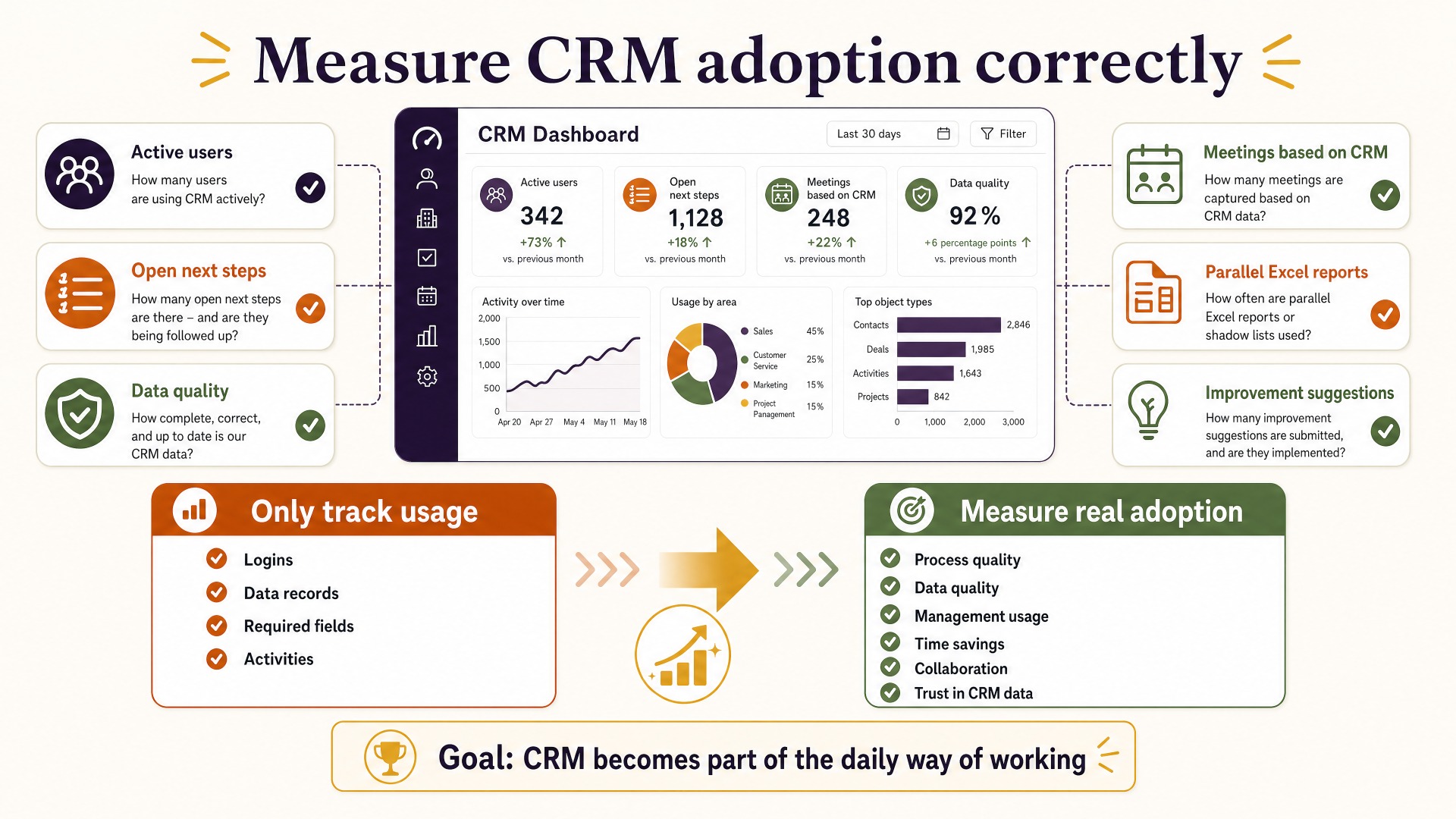
After go-live, many companies initially measure success via logins, records created, or mandatory fields completed. These metrics, however, only show whether the CRM is being used. They say little about whether users trust the system, actually steer processes through it, or maintain information in such a way that sales, service, and management benefit from it.
CRM adoption therefore means more than usage. It arises when the CRM becomes a natural part of the way of working and users recognize that good CRM usage brings concrete advantages to themselves and their colleagues.
Why go-live is not the end of the CRM project
In the weeks before a CRM go-live, the focus is often on technology. Data is migrated, interfaces tested, roles set up, training conducted, and open defects fixed. With the productive start, project pressure drops – and precisely therein lies a risk.
Because in live operation, questions emerge that are only partly visible during a test. Are screens really built sensibly? Are mandatory fields understood? Do handovers between marketing, sales, and service work? Are dashboards actually meaningful for managers? And above all: does the CRM support the real way of working, or does it force users into additional steps?
The first months after go-live should therefore be understood as an adoption and optimization phase. Companies observe what works, where friction arises, and which processes need to be adjusted.
A successful CRM is not a static IT system. It develops further together with the organization, processes, and users.
CRM usage is not the same as CRM adoption
An employee can log in daily and still try to work as little as possible in the CRM. A sales employee can maintain opportunities but continue to store essential information exclusively in their personal mailbox. A service team can process tickets without consistently updating customer data.
Technically, the CRM is being used. Organizationally, however, it is not yet established.
Real adoption shows in other behaviors:
- Employees trust the existing data.
- Sales meetings are held on the basis of the CRM.
- Next steps are documented consistently.
- Information is stored traceably for other teams.
- Managers rely on CRM dashboards instead of parallel Excel reports.
- Users report improvement suggestions themselves.
- Data quality is understood as part of the work.
- New employees learn processes directly from the CRM.
The most important difference is: Usage can be mandated. Adoption arises through perceived benefit.
Why CRM acceptance often declines after go-live
Directly after the rollout, attention is high. Training is fresh, project teams are available for questions, and management communicates the importance of the new system.
After a few weeks, the situation changes. Users develop routines. Small workarounds are accepted. Information is stored outside the CRM again. Old Excel lists reappear. Managers request additional reports instead of developing existing CRM dashboards further.
This rarely happens because of a single large problem. Usually it is many small points of friction:
- too many mandatory fields,
- unclear processes,
- unnecessary clicks,
- missing automations,
- incomprehensible dashboards,
- poor data from the migration,
- missing integrations,
- contradictory requirements,
- lack of ownership,
- too little visible benefit.
Individually, these problems seem manageable. In total, they can lead to employees increasingly perceiving the CRM as an administrative burden.
The decisive question: What does the user get back?
CRM owners often discuss which information users must maintain. For adoption, the reverse question is at least equally important:
What does the user get back in return?
When a sales employee maintains activities, contacts, next steps, and opportunity data, a concrete benefit should arise from it. The CRM could, for example, automatically create a meeting briefing, show open activities, detect risks, or prepare follow-ups.
A customer success team should, for example, be able to recognize renewal risks, open service cases, and customer history at a glance from well-maintained data.
A service employee should not have to search repeatedly for information that is already available in the CRM or in an integrated ERP.
The more visible this return of benefit is, the more willingness to maintain data increases.
Statistics: How CRM adoption can be measured after go-live
The following values are example values from typical CRM project situations and not universally valid benchmarks. They show which metrics companies can observe after go-live.
| Metric | Example directly after go-live | Target after 6 months | What it indicates |
|---|---|---|---|
| Active users per week | 72 % | > 90 % | Shows whether the CRM is used regularly |
| Opportunities with a documented next step | 58 % | > 90 % | Measures process discipline in sales |
| Complete mandatory information | 64 % | > 95 % | Indicator of data quality |
| Sales meetings based on CRM dashboards | 40 % | > 90 % | Shows management adoption |
| Parallel Excel reports | 8 | 1–2 | Shows whether the CRM is accepted as a steering system |
What is decisive is not to generate the highest possible usage figures. What is decisive is to choose metrics that show whether the CRM actually enables better processes.
10 levers for better CRM adoption after go-live
| No. | Lever | Description |
|---|---|---|
| 1 | Measure adoption | Observe not only logins, but process quality, data quality, and actual use of important functions |
| 2 | Involve managers | Consistently build pipeline, service, and management meetings on CRM data |
| 3 | Document friction | Systematically record cumbersome screens, unnecessary clicks, and missing automations |
| 4 | Implement quick wins | Realize small improvements quickly and communicate them visibly |
| 5 | Establish key users | Create contacts in the business units who collect feedback and support colleagues |
| 6 | Make data quality transparent | Make completeness, duplicates, and outdated data measurable |
| 7 | Role-based dashboards | Show each user group exactly the information relevant to their work |
| 8 | Improve integrations | Reduce media breaks with email, ERP, service, marketing, or other systems |
| 9 | Review processes regularly | Adapt CRM processes to actual ways of working and new requirements |
| 10 | Maintain the CRM roadmap | Prioritize improvements and develop the CRM continuously |
Managers determine adoption more than training does
Training is important but not sufficient. In the long term, employees orient themselves more strongly toward the behavior of their managers than toward project documentation.
When a sales manager continues to use an Excel file in the pipeline meeting, this sends a clear message: the CRM is not the authoritative source of information.
If, on the other hand, forecast, pipeline, open activities, and risks are discussed directly in the CRM, the significance of data maintenance changes. Users recognize that their entries feed directly into decisions.
Management adoption should therefore be considered separately.
Managers should:
- use dashboards in the CRM,
- address data quality,
- address missing information directly in the process,
- consistently reduce parallel reports,
- support improvement suggestions,
- strengthen CRM owners in prioritization decisions.
A CRM is rarely used more intensively than management itself sets an example for.
Key users instead of one-off training
A common mistake is to treat adoption primarily as a training topic. Before go-live, several trainings take place, and afterward the organization is expected to function permanently.
In reality, many questions only arise during daily use.
This is why key users or CRM champions are especially valuable. They sit close to the business units and understand both the process and the users’ perspective.
Their task is not to replace technical support. Rather, they help to recognize structural feedback.
When five sales employees ask the same question, there may not be a training problem. Perhaps the process is unnecessarily complicated.
Key users help to make exactly this difference visible.
- users do not understand the benefit,
- maintenance is too time-consuming,
- responsibilities are unclear,
- the CRM does not support the process sufficiently,
- information arises in other systems,
- managers do not use the data themselves.
Data quality should therefore not be improved exclusively through additional mandatory fields.
Often, better automation is more sensible. Data can, for example, be adopted from email, calendar, ERP, or other systems. AI can detect missing information or summarize records.
The goal should always be: as little manual maintenance as possible, but as much structured information as necessary.
CRM adoption and AI: A new lever
AI is increasingly changing the adoption discussion.
Until now, employees often had to enter data so that the company could later create reports. The direct personal benefit was limited.
With AI, this relationship can be changed.
Well-maintained CRM data can, for example, be used to:
- prepare customer appointments automatically,
- summarize opportunities,
- detect risks,
- prepare follow-ups,
- classify service cases,
- assess customer situations,
- suggest next best actions.
This creates a direct return.
The user maintains the CRM not only for management reporting. They receive better support for their own work.
In the coming years in particular, this is likely to become an important adoption lever.
CRM adoption needs a continuous improvement process
After go-live, a CRM should not switch into pure operating mode. More sensible is a fixed optimization rhythm.
A possible cycle could look like this:
Monthly
- review support questions
- analyze data quality metrics
- prioritize small improvements
- observe usage behavior
Quarterly
- interview business units
- review dashboards
- identify automation potential
- assess integrations
- update the CRM roadmap
Semi-annually
- review central processes
- review roles and permissions
- prioritize larger optimization projects
- assess management benefit
- compare adoption KPIs
This does not create an endless CRM project. Rather, the CRM is maintained continuously like a business-critical platform.
Practical example: Adoption six months after go-live
A B2B company introduces a new CRM for around 120 users in sales, service, and customer success.
The technical go-live works without problems. After eight weeks, the usage figures initially show a positive picture: around 85 percent of users log in at least once a week.
A closer analysis, however, reveals problems.
Only 61 percent of opportunities have a current next step. Several sales managers continue to use their own Excel reports. Customer success complains about missing information during customer handovers. At the same time, sales employees perceive certain mandatory fields as unnecessary.
The company therefore starts a three-month adoption sprint.
First, five particularly disruptive mandatory fields are reviewed. Two can be removed, two pre-filled automatically, and one explained better. Afterward, management dashboards are adjusted and Excel reports gradually abolished.
In addition, an automated opportunity briefing is created that makes well-maintained CRM data directly usable for sales employees.
After several iterations, the following picture could emerge, for example:
| Metric | Before | After the adoption sprint |
|---|---|---|
| Opportunities with a current next step | 61 % | 89 % |
| Regular CRM users | 85 % | 94 % |
| Parallel sales reports | 7 | 2 |
| Complete customer handovers | 68 % | 92 % |
| Average internal CRM questions per week | 31 | 14 |
These values are example values. What is decisive is the approach: analyze usage, understand causes, reduce friction, and then measure again.
Checklist: Has your CRM really arrived after go-live?
- Are central sales and service meetings held directly in the CRM?
- Do managers use CRM dashboards as their primary source of information?
- Are there still parallel Excel lists or shadow reports?
- Are opportunities and next steps up to date?
- Is it clearly defined who is responsible for data quality?
- Are there key users or CRM champions in the business units?
- Are improvement suggestions collected in a structured way?
- Is there a fixed prioritization process for CRM requirements?
- Are unnecessary mandatory fields reviewed regularly?
- Are recurring manual activities automated?
- Are email, calendar, ERP, and other important systems sensibly integrated?
- Are data quality metrics evaluated regularly?
- Can users recognize a personal benefit from well-maintained CRM data?
- Are there role-based dashboards for sales, service, and management?
- Is CRM adoption reviewed at least quarterly?
Conclusion: Adoption begins after go-live
A successful go-live initially means only that the CRM is technically available. Whether a successful CRM arises from it is decided only in daily operation.
Companies should therefore not measure exclusively how often employees log in. What is decisive is whether processes actually run through the CRM, data is reliable, managers use the system for steering, and users recognize a concrete benefit.
CRM adoption is not a one-off change project. It arises through continuous improvement.
Those who regularly reduce friction, question processes, expand automation, and make the benefit visible for users develop an implemented CRM into a platform that is genuinely anchored in the company.
Your CRM is technically live – but is it really being used?
We support companies in systematically analyzing CRM usage, data quality, and processes after go-live and deriving a concrete optimization roadmap from this.